








If you manage resource planning in a large organisation, chances are you spend a lot of time inside the schedule.
Our customers certainly do. Schedulers, project managers, and delivery leaders rely on Retain every day to understand who’s available, what work is coming up, and where capacity needs to move.
That’s why many of the improvements we release start with the same question: where does planning still feel harder than it should?
Over the past year, we’ve been refining several parts of the platform that planners interact with most often. The result is Retain Cloud 2.2, a release that introduces improvements across scheduling, booking workflows, reporting, and skills forecasting.
In this article, we’ll walk through what’s new in the 2.2 release and how these updates make day-to-day resource planning easier for complex organisations.
A more flexible resource planning interface for scheduling teams
Schedulers don’t all work the same way.
Some prefer a visual timeline where bookings appear across a schedule. Others work faster in a structured grid where hours can be edited directly, similar to working in Excel. Both approaches are useful depending on the task.
Retain Cloud 2.2 expands the Table view, giving planners a more flexible way to interact with planning data while keeping the existing Plans view available. Schedulers can switch between the two views depending on how they want to work with the schedule.

Within the enhanced Table view, planners can edit jobs, resources, and bookings directly in the grid. Hours can be entered at a daily level for short-term planning or weekly for longer-range scheduling. The structure makes it easier to make quick adjustments without navigating through multiple panels.
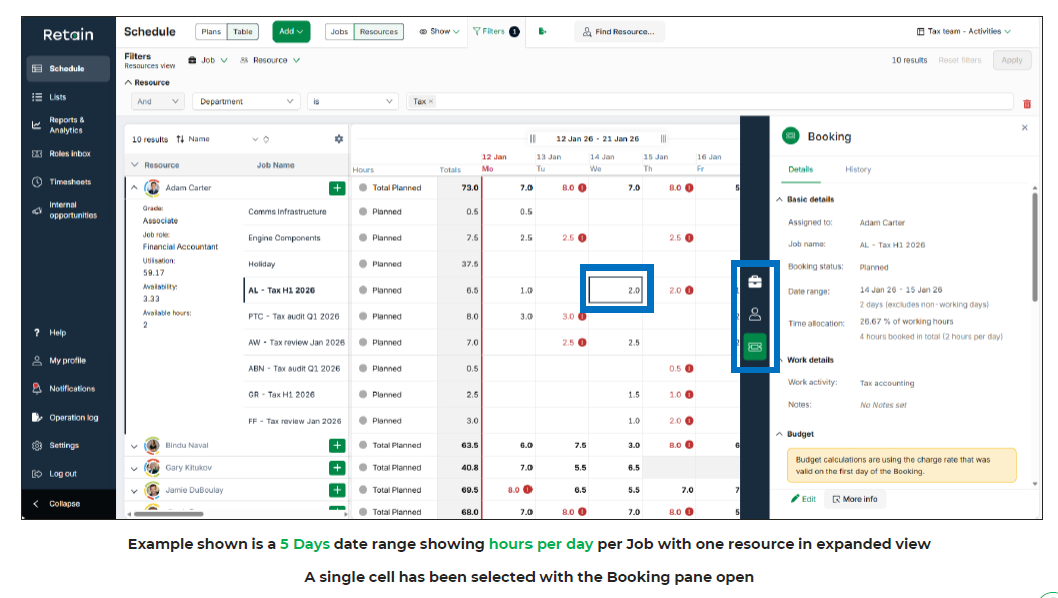
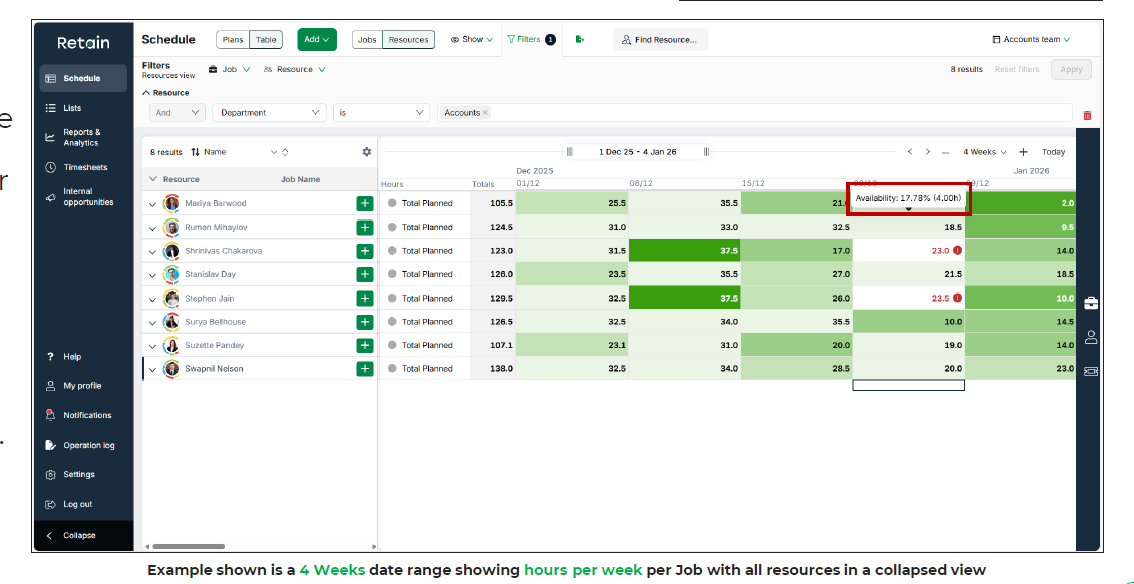
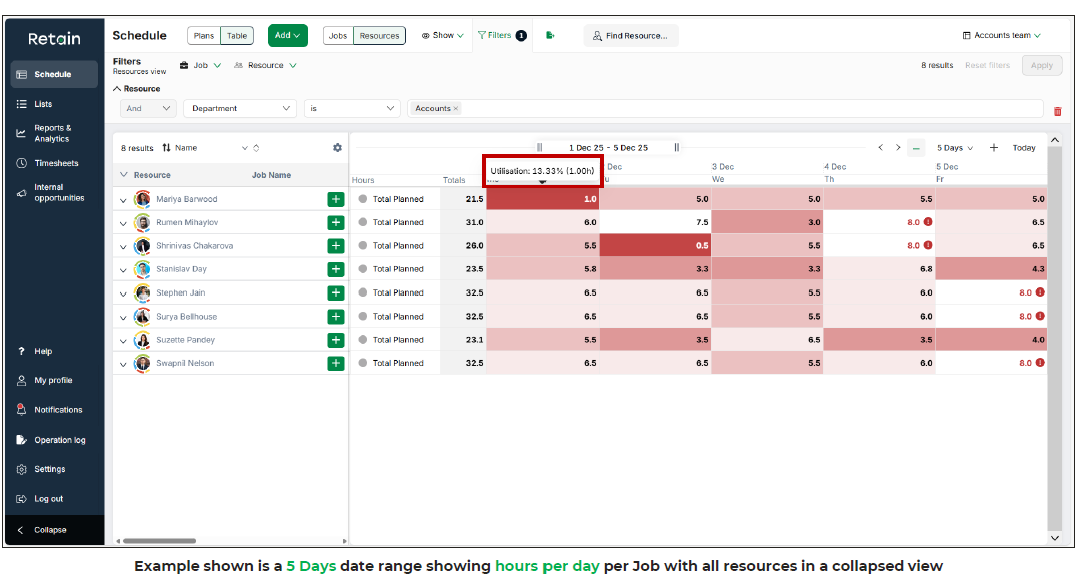
To help planners interpret the schedule more quickly, the update also introduces several heatmaps. These highlight resource availability, utilisation, and time allocation across the selected period. The colour coding provides a quick visual indication of where people have spare capacity and where workloads may need rebalancing.
This example uses a 6 weeks weekly table view and highlights a resources’ % of work hours. The key purpose of this heatmap is to highlight over utilisation.
This example uses a 5 days daily table view and highlights a resources’ utilisation in both % and total hours. The key purpose of this heatmap is to highlight low utilisation.
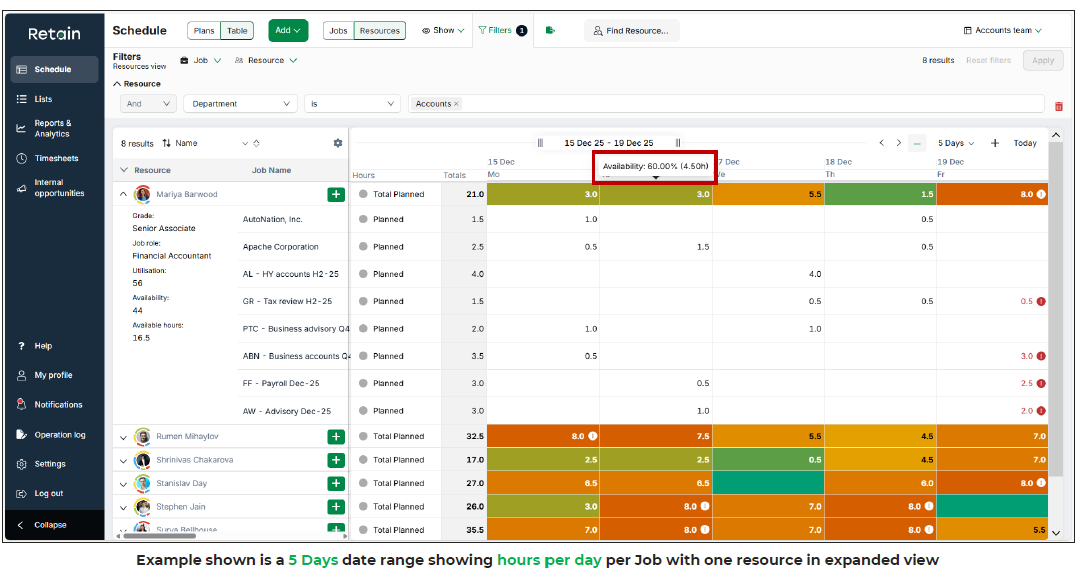
Finally, this example uses a 5 days date range where a scheduler can enter hours per day per job per resource. By hovering over an individual cell, a resource’s Availability is displayed in available hours and % of resource capacity.
Resources with high availability are marked in green.
Those with lower availability are marked in red.
As an interesting side note, a table view of data can also be exported to Excel in either CSV or Excel workbook format.
Improving project resource planning workflows
Anyone responsible for resource planning knows that schedules rarely stay fixed.
Client timelines move, internal priorities change, and work sometimes needs to start earlier or later than originally planned. Adjusting the schedule can quickly become time-consuming if multiple elements need to be updated individually.
Retain Cloud 2.2 introduces several improvements designed to make those adjustments easier.
One of the most practical additions is a booking change request workflow. When a user attempts to modify a booking but does not have permission to edit it directly, the system creates a request rather than rejecting the change. The request is then routed to the relevant managers for review and approval.
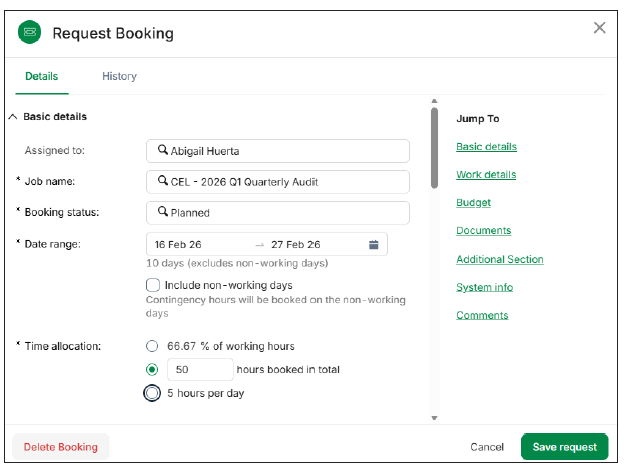
This keeps scheduling decisions visible while reducing the need for emails, messages, or manual coordination when bookings need to change.
Another improvement focuses on project timelines. The new Move Job capability allows planners to move an entire job forward or backward in time. Instead of adjusting multiple elements manually, the system moves related bookings, roles, and milestones together. A new start date can be set directly, or the job can be moved by a defined number of days or weeks.
Retain Cloud 2.2 also improves how planners build future schedules. The enhanced mass-duplicate capability allows bookings to be copied directly within the same job. Many organisations create draft schedules by starting from an existing structure, and this change reduces the amount of repetitive setup required when planning upcoming work.
Finally, the release introduces an improved pivot booking capability that makes it easier to move between resource and job views. When planners switch perspectives, the relevant booking remains in focus, allowing them to continue working without searching through the schedule again.
Individually these are small adjustments. Together they remove a surprising amount of friction from everyday planning tasks.
More control in skills-based resource planning
Assigning the right people to the right work often depends on both system recommendations and planner judgment.
Retain already provides suggested resources based on role requirements, skills, and availability. Retain Cloud 2.2 expands this capability by allowing planners to apply their own filters within the suggestions panel.
If the system-generated shortlist does not fully match what the planner is looking for, they can refine the results using additional resource filters and generate a new set of candidates. From there, they can assign the most appropriate person to the role or return to the original recommendations.
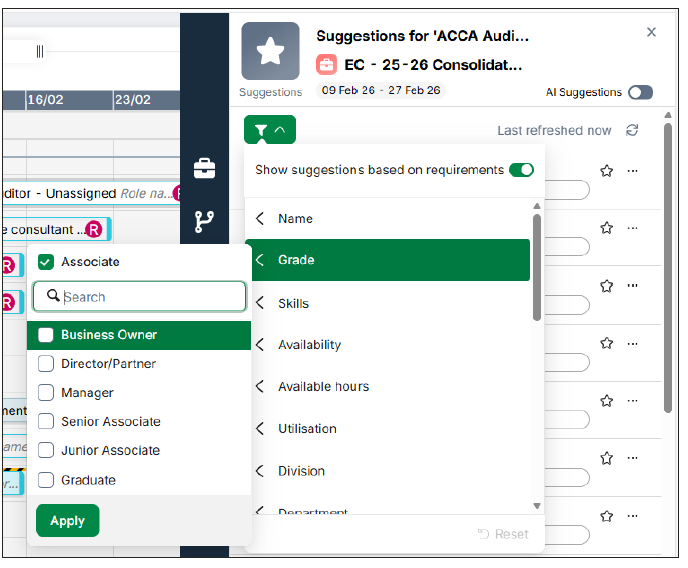
The release also introduces improvements in how inactive resources are handled. Organisations can now decide how future bookings for inactive employees should be managed. Bookings can either remain assigned to the individual or automatically become unassigned work that needs to be reallocated.
This provides more flexibility when managing staff changes without disrupting existing schedules.
Workforce planning insights with new forecasting and reporting
Planning resources effectively also depends on understanding demand beyond the current schedule.
Retain Cloud 2.2 introduces several reporting capabilities that provide a clearer view of project performance and future workforce needs.
The new Cost to Complete reports help organisations track project performance against budgets. By combining job budgets with timesheet data, the reports calculate remaining hours, projected hours, and potential variances. A financial version of the report performs the same analysis using cost and revenue data.
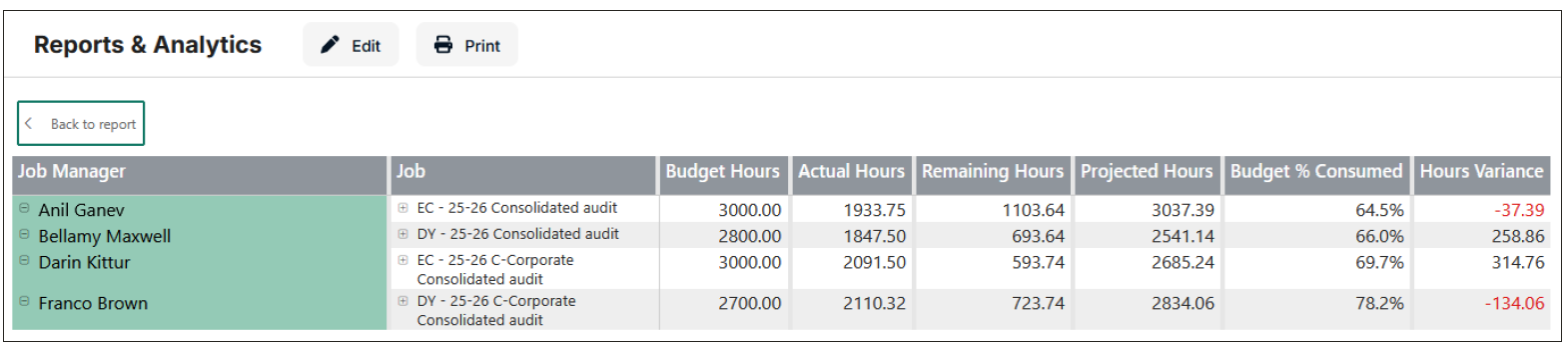
These insights help project managers and leadership teams understand how projects are progressing and whether adjustments may be needed before delivery is complete.
The release also introduces two new reports focused on workforce capability: the Skills Forecast report and the Skills Trend report.
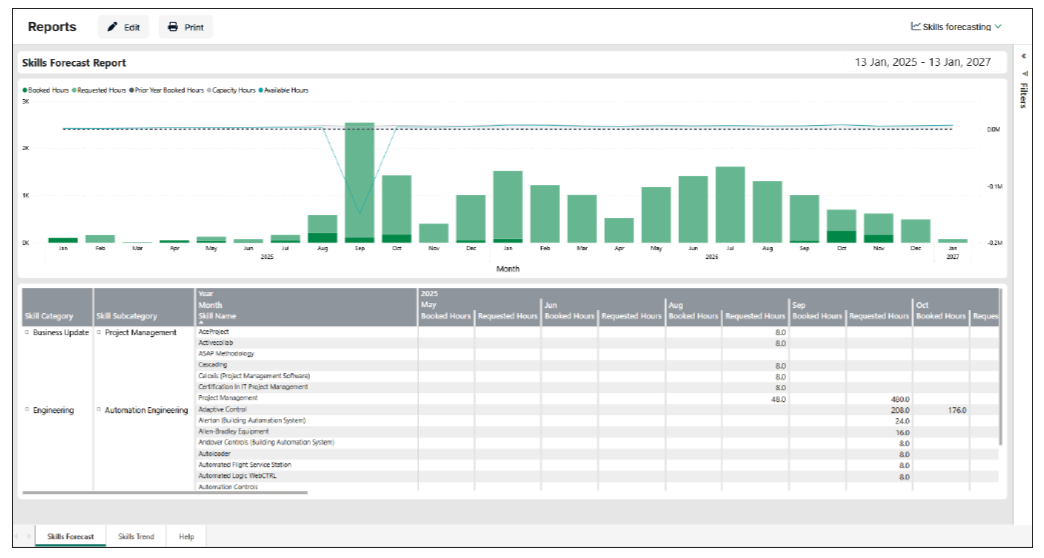
The Skills Forecast report evaluates historical demand for skills and compares it with future requirements based on planned roles. It also considers future capacity, giving organisations a view of potential capability needs one, two, or three years ahead.
The Skills Trend report compares historical skills usage with upcoming project requirements, making it easier to identify areas where demand may exceed available expertise.
Together, these reports provide a stronger foundation for workforce planning, helping organisations connect day-to-day resource scheduling with longer-term capability planning.
Continuing innovation in enterprise resource planning
Large organisations rely on resource planning systems every day. Small inefficiencies quickly add up when schedules span hundreds of people and multiple departments.
Retain Cloud 2.2 focuses on removing some of those inefficiencies. Improvements to planning views give schedulers more flexibility. Workflow enhancements simplify how bookings and project timelines are adjusted. New reports provide better insight into project performance and future skills demand.
The result is another step forward in Retain’s ongoing development of a platform designed to support complex, skills-driven organisations.
Now your turn to try
If you’re already a Retain customer and would like to explore the new capabilities, your Retain account manager can walk you through what’s included in the 2.2 release and how it may apply to your organisation.
If you’re new to Retain and interested in a more connected approach to resource planning and workforce management, we’d be happy to show you how the platform works in practice.
Book a personalised demo to see Retain Cloud in action.

