





Resource planning doesn’t usually lose time in big, obvious ways. It happens in the small stuff, like finding the right view, reordering a plan, jumping between records to track something down, or sharing the right version with the right people.
That’s where a lot of planning teams feel the drag in the effort it takes to work with it day to day.
Retain Cloud Release 2.3 focuses on that part of the job. The updates are built around the mechanics of planning, including how teams organise their workspaces, move through data, assign resources, and bring information into the platform, so it’s easier to keep things moving without adding extra steps.
If you’re new to Retain, we’d love to show you around. You can book a personalised demo here.
The true cost of this issue is reflected in the amount of time that’s currently lost to inefficient resource planning:
Where resource planning loses time:
- Resource managers spend 7.5 hours per week on manual reporting, equivalent to a full working day lost to admin.
- 47% of project managers lack access to real-time data, making it harder to respond when work changes quickly.
- Around 26% of the working day is lost to inefficient processes and manual tasks.
- Employees spend 51% of their time on low-value work, including searching for information and updating systems.
- Billable utilisation in professional services has dropped to 68.9%, with visibility and planning challenges a key factor.
A new way to manage resource planning in real time
Let’s start with the biggest change in this release.
For many teams, resource planning works well at a high level. You can see who’s assigned, where time is going, and how work is distributed. But it gets harder when the work becomes more granular.
You’re no longer looking at weeks or months, you’re looking at days, sometimes hours. One person juggling multiple tasks. Priorities changing quickly.
But traditional schedule views aren’t built for that level of movement. They show allocation well, but they’re slower when you’re trying to track and manage lots of smaller pieces of work.
This is where the Kanban view comes in.
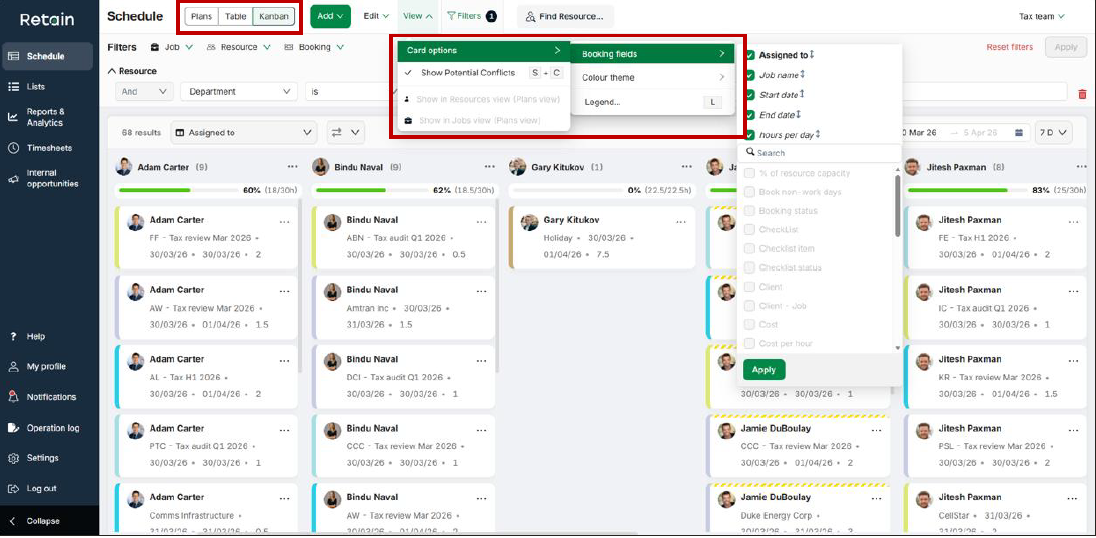
It breaks bookings down into individual cards, giving teams a task-based view of resource planning. Basically, this means you can see exactly what each person is working on, how work is progressing, and how it’s organised day to day.
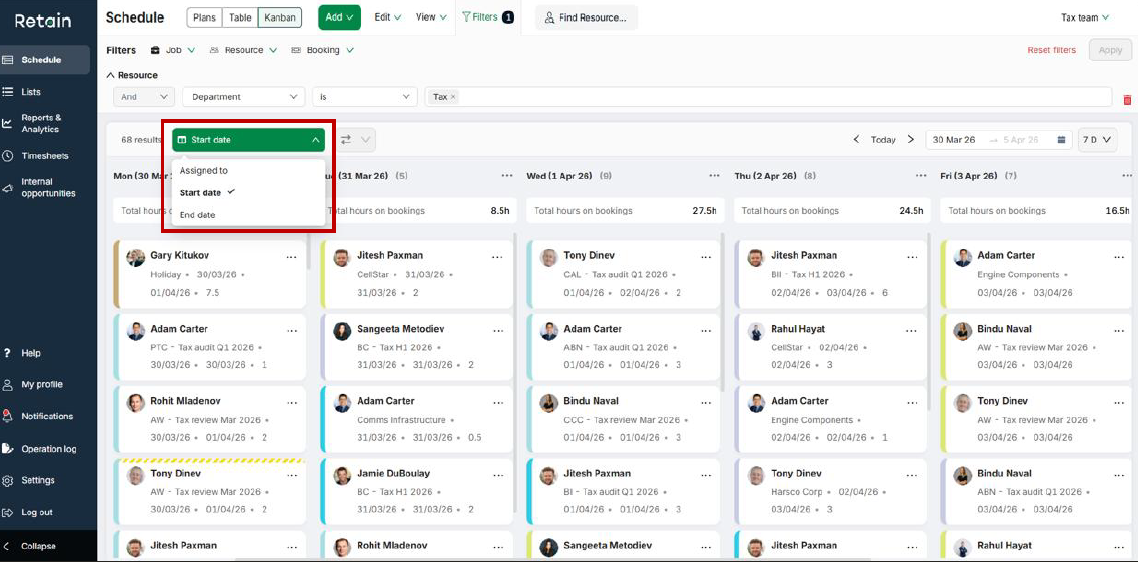
You can organise work by resource, start date, or end date, depending on what you need to focus on. And because everything is interactive, you can move between views, update bookings, and manage work directly from the same place.
Faster access to resource planning data and answers
The next thing that slows teams down is finding what they need once they’re in the plan. For instance, when you’re trying to answer a simple resource planning question, such as who has capacity? Or where is demand building? Which teams are overloaded?
You sort one way, then another. You scroll. You filter. You’re close, but not quite there.
Even with strong data, resource management becomes slower when teams have to keep reshaping the view just to get clarity.
This release makes that process much quicker.
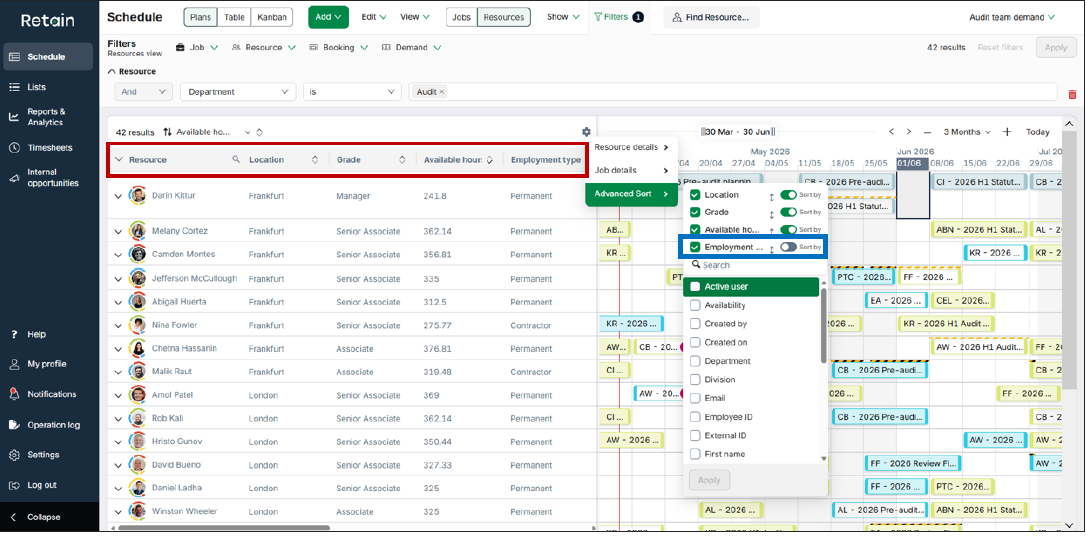
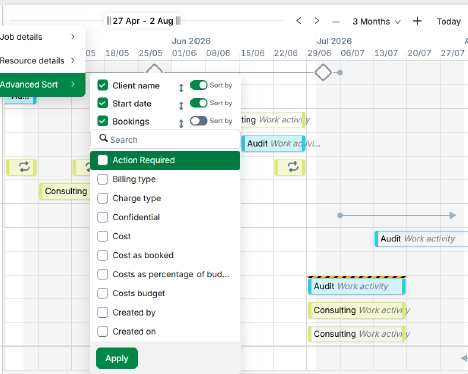
Advanced sorting gives teams more control over how resource planning data is organised. You can sort by multiple attributes, like location, grade, or availability, and build a view that reflects how your workforce is actually structured.
At the same time, getting to a specific resource or job is much faster. Instead of working through layers, you can jump straight to what you’re looking for and carry on.
In other words, less time navigating. More time acting on what the data is telling you.
Making resource planning views easier to share and reuse
This is where a lot of time goes without anyone really noticing. You open a plan, but it’s not quite in the format you need. So you tweak it. Then tweak it again. Then save a version for yourself. Someone else does the same. Before long, there are multiple versions of the same thing, all slightly different.
The problem is when people aren’t working from one shared view. They’re rebuilding it over and over just to get to something usable.
This release tackles that head on.
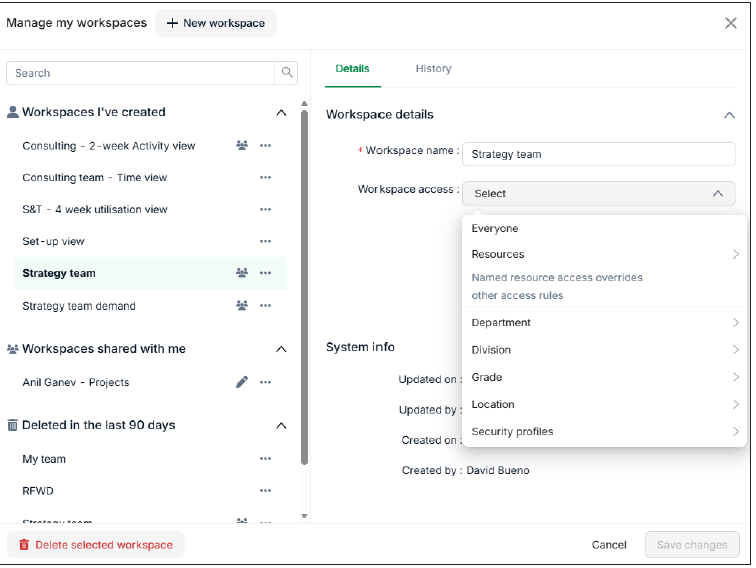
Workspaces can now be shared far more precisely, whether that’s with specific people, departments, divisions, or roles, so teams are starting from the same place.
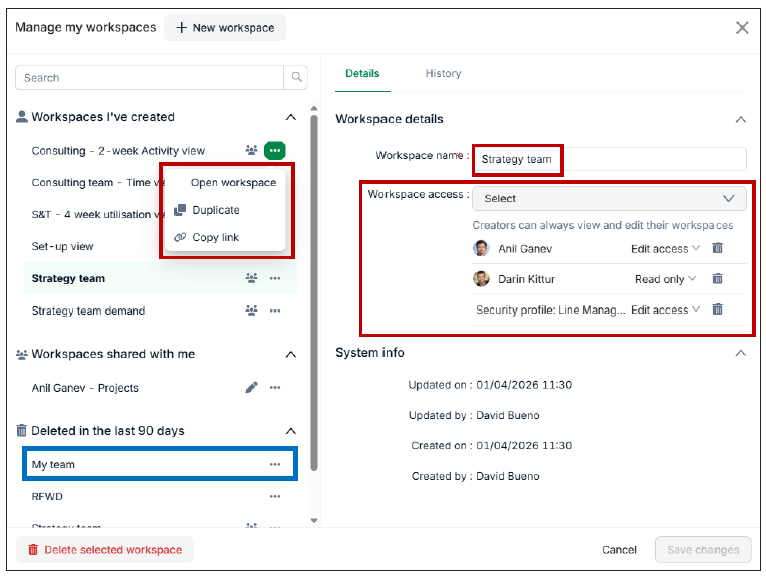
At the same time, it’s easier to duplicate, adjust, and reuse those views without starting from scratch. And if something gets removed or changed, there’s a history behind it, so you’re not losing track of what’s been done.
Essentially, this means less rebuilding and more consistency in how teams are working with the plan.
More control over resource allocation when plans change
Even with the right data in place, resource planning often slows at the point of decision. You’ve reviewed the options. The system suggests a match. Filters narrow things down. But you already know who should take the role.
The problem can be getting the system to reflect it quickly without working around it.
This release gives that control back.
Schedulers can now assign resources directly to demand requests within the roles workflow. No need to rely on suggestions, matching logic, or additional steps. If you know who should be assigned, you can make that call immediately.
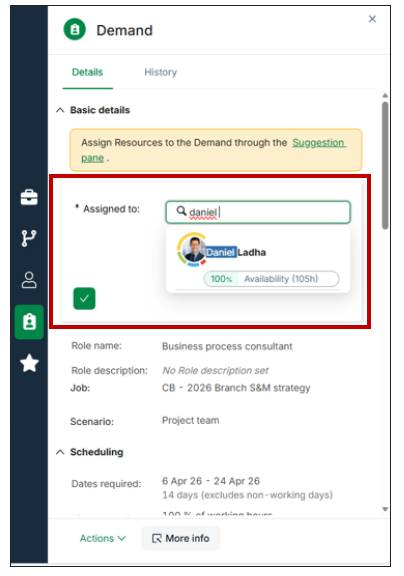
This means resource allocation becomes more responsive. Teams can act on real-world context, such as client needs, team dynamics, and availability, without being held up by process.
Reduce admin in resource and workforce planning
The last area where time tends to go is getting data into the system in the first place.
Bookings, roles, and updates (especially when they’re coming from outside sources) can take time to input manually. It’s repetitive, easy to get wrong, and slows down how quickly plans reflect what’s actually happening.
This is where resource planning and workforce planning lose momentum.
This release makes that process more efficient.
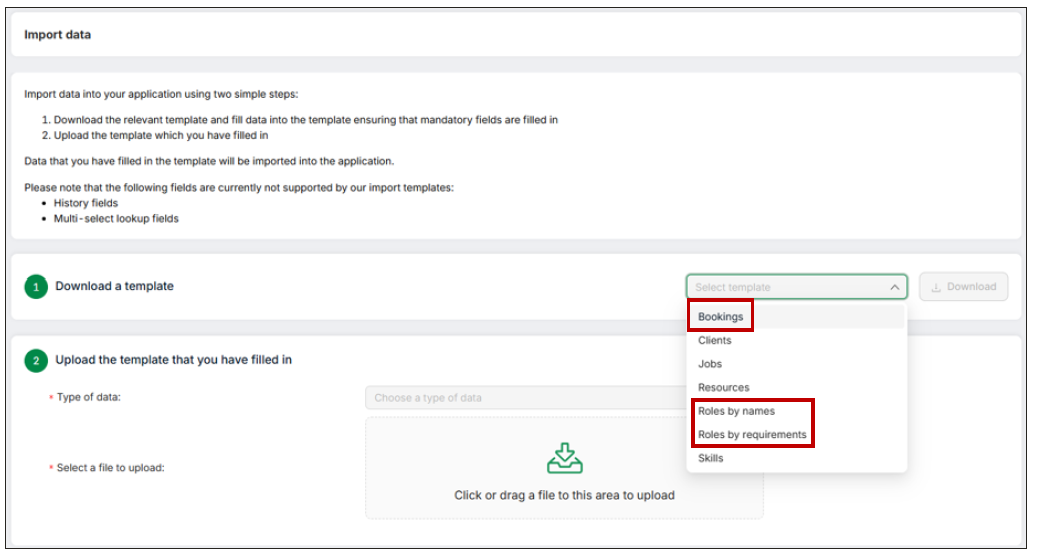
Teams can now upload bookings and roles directly into Retain, bringing planning data into the platform in one step. Once imported, that data is immediately visible across the interface, ready to be used in resource management and capacity planning decisions.
So instead, less time spent on manual input. More time working with accurate, up-to-date plans.
Why ease of use drives better resource planning outcomes
Even when the foundations are strong, resource planning can still feel slow, because every small interaction with the system takes a bit more effort than it should.
- Finding the right view.
- Sorting the data.
- Assigning the right person.
- Keeping everything up to date.
Do that enough times, and it adds up.
The good news is, the best resource management platforms, like Retain, make it easier for teams to work through the plan quickly, confidently, and without friction.
That’s what Retain 2.3 is focused on.
From how workspaces are shared, to how data is organised, to how decisions are made and updates are handled, these changes are designed to remove the small delays that slow teams down day to day.
As a result, resource planning becomes easier to maintain, easier to adapt, and easier to act on.
And that’s where the real value shows up, in faster decisions, better-aligned teams, and plans that actually keep pace with the work.
If you want to see how these updates work in your own environment, it’s well worth seeing Retain in action.
From Kanban views through to workspace sharing and resource allocation, you can explore how teams are using Retain Cloud to plan faster, stay aligned, and keep work moving without the usual friction.
👉 Book a personalised demo to see what that looks like for your team.
Or if you still have unanswered questions, check out our FAQs below.
FAQs
What’s new in Retain Cloud Release 2.3?
Retain Cloud Release 2.3 introduces a new Kanban view for managing work at a more granular level, alongside enhancements to workspace management, advanced sorting, and navigation. It also includes the ability to manually assign resources to role requests and upload bookings and roles directly into the platform.
How does the Kanban view improve resource planning?
The Kanban view gives teams a task-based way to manage work, breaking bookings into individual cards that can be organised by resource, start date, or end date. This makes it easier to manage short-duration work, track multiple tasks per person, and adjust plans quickly as priorities change.
How do workspace enhancements help with resource management?
Workspace enhancements allow teams to share planning views more precisely with specific users, departments, or roles. Workspaces can also be duplicated, recovered, and tracked through a change history, helping teams stay aligned and avoid rebuilding the same views multiple times.
What does advanced sorting add to resource planning?
Advanced sorting allows teams to organise resource planning data using multiple attributes, such as location, grade, or availability. This makes it easier to analyse capacity, understand workforce distribution, and quickly get to the answers needed for planning decisions.
How does “Go to Resource or Job” improve planning workflows?
This feature allows users to quickly search for and navigate to a specific resource or job within the schedule view. Instead of manually scanning or filtering large datasets, teams can jump directly to what they need and continue planning without interruption.
What is manual resource assignment and when would you use it?
Manual resource assignment allows planners to directly assign a specific person to a role request within the workflow. This is useful when planners already know the right fit based on experience, client needs, or team dynamics, and want to override suggested matches or automated options.
How do bookings and roles uploads improve efficiency?
Teams can now upload bookings and roles directly into Retain, bringing planning data into the system in one step. This reduces manual input, improves accuracy, and ensures that resource planning data is available immediately for decision-making.
Who is Retain Cloud 2.3 designed for?
The updates in Release 2.3 are particularly useful for professional services teams managing complex, fast-moving workloads. This includes environments where people are working across multiple tasks, priorities shift regularly, and teams need to stay aligned across different functions.

