If you manage resources, you probably spend a fair amount of your day figuring out who’s available, who has the right skills, and how to keep projects staffed when priorities inevitably change. The best resource scheduling software makes that job a whole lot easier.
Choosing a new scheduling tool might not be the most exciting item on your to-do list, but it can have a surprisingly big impact. The right platform can cut hours of manual admin, flag scheduling conflicts before they become problems, improve utilisation, and give you a clearer picture of capacity across your business.
So, which platform should you choose? We’ve reviewed the best resource scheduling software for 2026, comparing 13 leading tools on scheduling, capacity planning, skills matching, AI, forecasting, integrations and more.
What this guide covers
There are plenty of resource scheduling software options out there, from simple drag-and-drop calendars to enterprise platforms capable of scheduling thousands of people across departments and locations.
To make the comparison useful, we’ve focused on the things that actually matter when you’re trying to get the right people onto the right work:
- Scheduling experience: How easy is it to create, change, and manage bookings?
- Capacity and availability: Can you quickly see who’s free, overloaded, or coming available?
- Skills-based scheduling: Can you search for people based on their skills, experience, and suitability for the work?
- Conflict management: Does the software help you catch double bookings and potential scheduling problems?
- AI and automation: Can it speed up resource matching or take repetitive scheduling tasks off your plate?
- Forecasting: How well can you see future demand and capacity?
- Integrations: Does it connect with the HR, CRM, finance, calendar, and project systems you already use?
- Scalability: Will it still work when you’re scheduling across multiple teams, departments, or regions?
We’ve combined our own research with verified customer reviews from G2, Capterra, and TrustRadius to compare 13 of the best resource scheduling tools for 2026.
Key takeaways
Short on time? Here’s our quick take on the best resource scheduling software for 2026:
- Retain: Best overall for professional services and complex organisations that need to schedule around skills, availability, experience, and suitability.
- Resource Guru: Best for straightforward, visual team scheduling and quickly spotting availability or clashes.
- Teambook: Best for smaller teams that want simple drag-and-drop resource scheduling.
- Productive: Best for agencies that want to connect resource scheduling with project profitability.
The biggest thing to consider is how complex your scheduling really is. If you mainly need to know who’s free next Tuesday, a lightweight scheduling tool could do the job perfectly well. If you’re allocating people based on skills, certifications, client experience, utilisation, location, and availability across a large workforce, you’ll need much more depth.
Next step: Book a demo of Retain to see skills-powered resource scheduling in action.
Quick comparison: 13 best resource scheduling software tools for 2026
Need the short version? Here’s how the best resource scheduling software options compare based on the type of scheduling they’re best suited to and their standout strengths.
| Software | Best for | Scheduling complexity | Standout strength |
| Retain | Professional services firms with complex scheduling needs | Complex / enterprise | Skills-based, AI-powered matching and cross-department visibility |
| Dayshape | Large organisations | Large / enterprise | Scheduling linked to profitability and utilisation |
| Kantata | Service organisations using a PSA-led approach | Large / enterprise | Connecting resource scheduling with project delivery and financials |
| Meisterplan | PMOs and portfolio leaders | Large / enterprise | Scenario planning and portfolio-level capacity management |
| Resource Guru | Teams that want straightforward resource scheduling | Day-to-day | Visual scheduling, availability and clash management |
| Float | Teams balancing people, projects and financial performance | Day-to-day | Visual scheduling with utilisation and financial visibility |
| Teambook | Small to mid-sized teams and agencies | Day-to-day | Simple drag-and-drop scheduling and capacity visibility |
| Hub Planner | Organisations scheduling across multiple teams | Day-to-day | Resource heatmaps, availability and utilisation reporting |
| Productive | Agencies and consultancies | Scheduling + business management | Connecting capacity planning with project profitability |
| Scoro | Professional services firms wanting broader operational management | Scheduling + business management | Projects, resources and financials in one platform |
| Celoxis | PMOs managing multiple concurrent projects | Scheduling + business management | Portfolio resource planning and project financials |
| Wrike | Cross-functional teams managing collaborative project work | Scheduling + business management | Flexible workload planning and workflow management |
| monday.com | Small to mid-sized teams with lighter scheduling requirements | Scheduling + business management | Flexible workload views and easy customisation |
It’s worth noting that there’s no universal winner here. A team scheduling 30 people across a handful of projects will have very different requirements from a professional services firm allocating thousands of people based on skills, certifications, client experience, and availability.
That’s why we’ve grouped our reviews by scheduling complexity, so you can jump straight to the tools that make sense for the way your organisation works.
Best resource scheduling software for complex and enterprise scheduling
Once you’re scheduling hundreds or thousands of people, things get complicated pretty quickly. You’re often working across departments, offices, and geographies, while juggling availability, skills, certifications, client requirements, and changing project demand. Finding someone with space in their calendar is only one part of the decision. You also need to know whether they’re actually a good fit for the work.
That’s where more advanced resource scheduling software comes in. These platforms give resource managers deeper visibility into their workforce, with features such as skills matching, forecasting, scenario planning, and automation helping them make faster scheduling decisions at scale.
For organisations with more complex requirements, these are the four platforms we’d consider:
- Retain: Best for skills-based, AI-powered professional services scheduling
- Dayshape: Best for scheduling with profitability optimisation
- Kantata: Best for PSA-led resource scheduling
- Meisterplan: Best for portfolio-level capacity planning
First up, let’s look at Retain.
Retain: Best for skills-based, AI-powered professional services resource scheduling
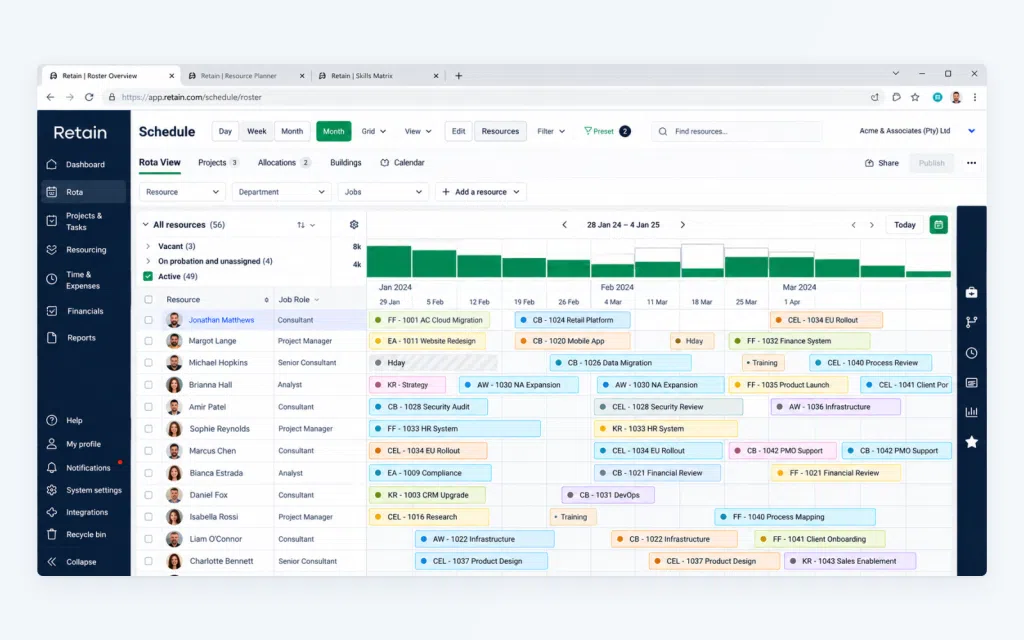
We’ll get the obvious bit out of the way: yes, this is our own software. So rather than asking you to take our word for it, we’ll focus on where Retain fits, what it does, and the results customers are seeing.
Retain is built for complex resource scheduling, particularly in professional services firms. Resource managers may also need to consider skills, proficiency, certifications, previous experience, client requirements, workload, and team dynamics before making an assignment.
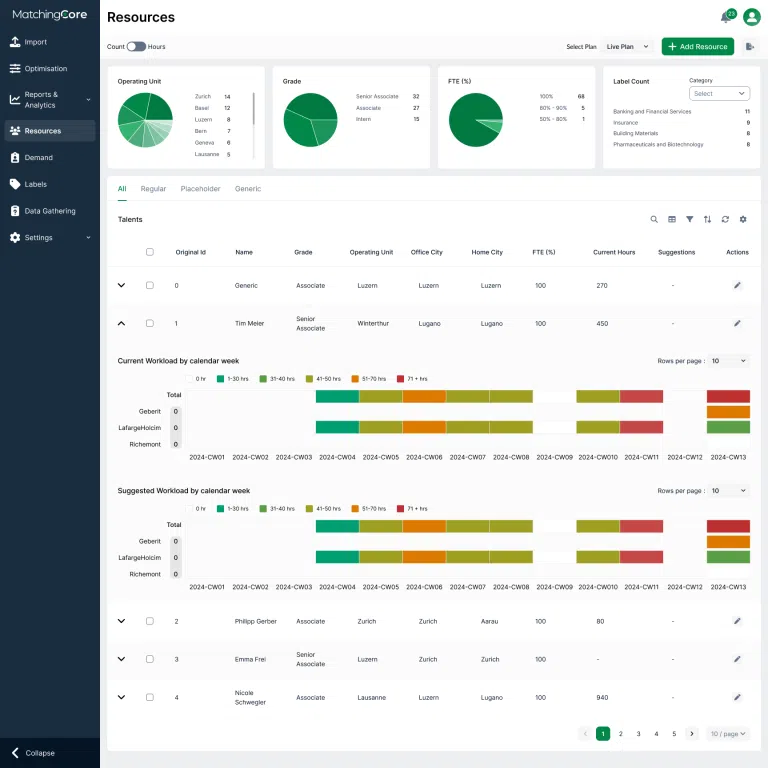
Its big strength is bringing those signals together. Retain combines live scheduling and capacity data with Skills+ skills intelligence, AI-powered resource matching and behavioural insights, giving resource managers a clearer picture of who is available and who is genuinely suitable for the work.
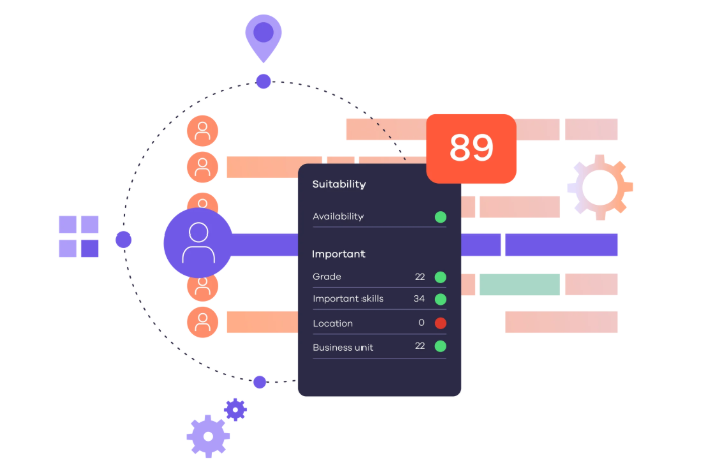
Retain MatchingCore also considers multiple signals when assessing suitability, including skills and availability, and gives resource managers context around its recommendations so they can understand why someone has been suggested. The resource manager then applies their own knowledge and judgement before making the final scheduling decision.
TL;DR
- Best for: Professional services firms with complex, skills-dependent scheduling requirements
- Core strength: Connecting skills, suitability, and availability in one scheduling environment
- Skills intelligence: Skills+ taxonomy powered by Lightcast, with up to 30,000 skills
- AI: Ranked resource recommendations based on multiple suitability signals
- Scale: Unified visibility across departments, teams and locations
- Integrations: Microsoft Dynamics 365, Office 365, Salesforce, Workday, SAP, IRIS and more
Standout features
- AI-powered resource matching: Surface and rank suitable people using skills, role requirements, preferences, and availability.
- MatchingCore AI-powered optimisation: Generate ranked recommendations for open roles based on suitability signals including skills and availability, with context to help resource managers understand each match and make the final decision.
- Skills+ intelligence: Create a consistent skills language across the organisation and find expertise beyond job titles.
- Real-time scheduling: See bookings, availability, utilisation and upcoming capacity in one place.
- Cross-department visibility: Search for talent across Audit, Tax, Advisory, and other teams instead of keeping resource pools siloed.
- Conflict management: Identify scheduling clashes and overallocations as plans change.
- Behavioural profiling: Consider communication preferences and working styles when building teams.
- Live dashboards: Track bookings, unassigned roles, utilisation, billable hours and other planning priorities.
- Enterprise integrations: Connect resource and project data with systems including Dynamics 365, Salesforce, Workday, SAP and IRIS.
When Retain fits best
Retain is particularly well suited to professional services organisations where scheduling decisions depend on multiple factors and need to work at scale.
If you’re scheduling across departments or geographies, regularly searching for specialist expertise, managing certification requirements, or trying to make better use of skills hidden elsewhere in the business, its combination of scheduling, skills intelligence and AI becomes especially relevant.
For a small team that mainly needs a shared calendar and simple availability management, there are lighter options further down this list.
Verdict
Retain makes the most sense when resource scheduling is a matching problem as much as a capacity problem. Its combination of live availability, skills intelligence and AI-powered recommendations helps resource managers narrow large talent pools into a much more useful shortlist, while keeping human judgement at the centre of the final decision.
For professional services firms managing complex scheduling across large workforces, that makes Retain one of the strongest options on this list.
Book a personalised demo to see Retain in action.
Dayshape: Best for scheduling with profitability optimisation
Dayshape is an AI-powered resource management platform. It combines resource scheduling with forecasting and financial data, making it particularly relevant for larger organisations that want to understand the commercial impact of their staffing decisions.
Its scheduling capabilities are built around automation. Dayshape can use project requirements, resource availability and financial targets to help firms allocate people across engagements and respond when plans change.
TL;DR
- Best for: Large professional services firms that want to connect scheduling decisions with profitability
- Core strength: Automated scheduling alongside financial and utilisation insights
- AI: AI-assisted resource allocation and scheduling
- Forecasting: Capacity, utilisation, and demand forecasting
- Scale: Designed for complex professional services environments
- Integrations: Salesforce, Workday, Microsoft Power BI and other business systems
Standout features
- AI-assisted scheduling: Automate parts of the resource allocation process based on defined project and workforce criteria.
- Profitability insights: Bring financial considerations into resource planning and scheduling.
- Scenario modelling: Test different staffing plans before confirming assignments.
- Capacity forecasting: Understand upcoming workload, availability and potential resource gaps.
- Utilisation tracking: Monitor how effectively available capacity is being deployed.
- Enterprise integrations: Connect resource planning with wider CRM, HR and reporting systems.
What users say
Verified reviews frequently highlight Dayshape’s usability and the visibility it provides once implemented.
One G2 reviewer described the platform as “very user friendly and intuitive”, while also commenting that they would like greater dashboard customisation for partners and managers.
That’s worth considering if highly tailored reporting views are an important part of your requirements.
Verdict
Dayshape is a strong option for firms that want resource scheduling closely connected with commercial performance. Its combination of automated scheduling, forecasting, scenario modelling and profitability insights gives resource teams useful tools for managing complex workforce decisions at scale.
If skills intelligence and detailed suitability matching are particularly important to your scheduling model, Retain is also worth exploring. For a deeper look at the two platforms, read our Retain vs Dayshape comparison.
Kantata: Best for PSA-led resource scheduling
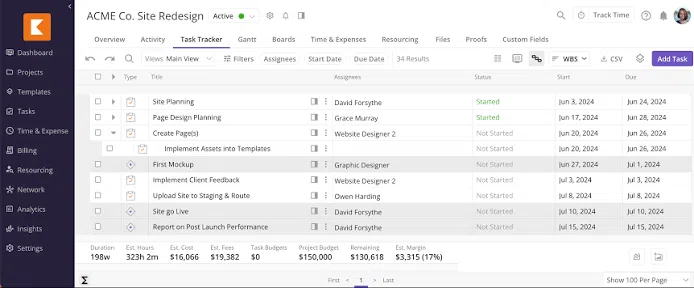
Kantata takes a broader approach to resource scheduling, bringing it into a professional services automation (PSA) platform that also covers project delivery, financial management and operational performance.
That makes it a good fit for service organisations that want their scheduling decisions closely connected to what’s happening across projects and the wider business.
TL;DR
- Best for: Organisations looking for scheduling within a wider PSA platform
- Core strength: Connecting resource planning with project delivery and financial management
- Scheduling: Resource allocation, capacity planning, and forecasting
- Financial visibility: Utilisation, revenue, and margin reporting
- Scenario planning: Model potential staffing and project changes
- Integrations: Salesforce, Workday, NetSuite, Xero, BambooHR, Jira, HubSpot and more
Standout features
- Resource scheduling: Allocate people across projects and monitor workloads from a central system.
- Capacity forecasting: See current availability and anticipate future resource requirements.
- Scenario planning: Model potential staffing and project changes before putting them into action.
- Skills visibility: Search and plan resources using skills and role information.
- Project portfolio management: View resource requirements across multiple engagements.
- Financial reporting: Track utilisation, revenue, margin and other commercial metrics.
- Workflow automation: Create repeatable processes around project and resource management.
- Business integrations: Connect with platforms including Salesforce, Workday, NetSuite and BambooHR.
What users say
Kantata’s integration between resource management and wider project delivery comes up positively in user reviews.
One Capterra reviewer said that having the platform connected directly with Salesforce provided “a more complete view from pre-sales through project close-out”, adding that resource management had been well executed.
Reporting is one area to investigate during a demo. Other reviewers have described some reporting workflows as cumbersome or difficult to navigate, particularly when more complex configuration is required.
Verdict
Kantata offers plenty of depth for service organisations looking to bring resource scheduling, projects and financial management together. Its forecasting, scenario planning and PSA capabilities make it a strong option for businesses that want one environment covering much of the professional services lifecycle.
For organisations where the scheduling decision itself depends heavily on detailed skills intelligence, suitability and finding specialist expertise across departments, a more resource-focused platform such as Retain may be a better fit.
Meisterplan: Best for portfolio-level capacity planning
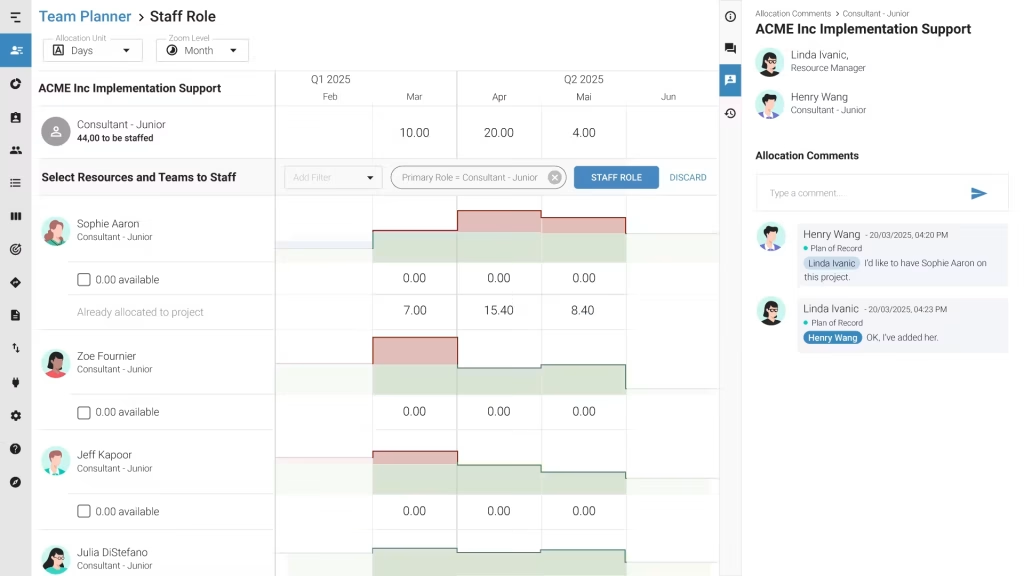
Meisterplan approaches resource scheduling from a slightly different angle. It’s designed for organisations that need to decide how limited capacity should be distributed across a portfolio of competing projects and priorities.
That makes it particularly useful for PMOs and leadership teams asking bigger-picture questions: Do we actually have the people to deliver everything we’ve planned? Where are the bottlenecks? And what happens to capacity if we move one project ahead of another?
TL;DR
- Best for: PMOs and organisations managing multiple competing projects
- Core strength: Connecting capacity planning with portfolio priorities
- Scheduling: High-level resource allocation across projects
- Scenario planning: Model different project and staffing combinations
- Forecasting: Compare future resource demand with available capacity
- Integrations: Jira, ServiceNow, Power BI, Azure, Clarity, Excel and Zapier
Standout features
- Scenario planning: Compare different portfolio and resource plans before committing to them.
- Capacity management: Identify where demand exceeds available resources.
- Portfolio prioritisation: Assess resource requirements alongside strategic project priorities.
- Resource allocation: Understand how people and teams are distributed across initiatives.
- Bottleneck visibility: Surface areas where limited capacity could delay delivery.
- Real-time analytics: Monitor demand, capacity and portfolio health.
- Integrations: Connect planning data with tools including Jira, ServiceNow and Power BI.
What users say
Meisterplan users frequently highlight its ability to make resource constraints easier to see.
One Capterra reviewer described the platform as an “eye-opener for resource bottlenecks”, while another said it helped their organisation prioritise its most valuable projects and focus resources accordingly.
Its portfolio-level focus is worth bearing in mind, though. Some reviewers have wanted greater depth for day-to-day scheduling, which makes sense given that Meisterplan is primarily designed to support higher-level portfolio and capacity decisions.
Verdict
Meisterplan is strongest at the strategic end of resource scheduling. Its scenario planning and portfolio views help organisations understand the consequences of changing priorities before those decisions create capacity problems further down the line.
For PMOs trying to balance ambitious project portfolios against finite resources, that bigger-picture visibility can be extremely useful.
Best resource scheduling software for visual day-to-day scheduling
You don’t need enterprise-level complexity to have a scheduling headache. For many teams, the biggest challenge is much more immediate: Who’s free? Who’s overloaded? Where can we move this booking? And does anyone actually have capacity for the project that just landed?
This is where visual resource scheduling tools come into their own. They make it easy to see workloads across people and projects, move bookings around as plans change, manage leave and spot clashes before someone ends up scheduled for three things at once.
If that sounds closer to your day-to-day, these resource scheduling software options are worth a look:
- Resource Guru: Best for straightforward visual resource scheduling
- Float: Best for visual scheduling with financial visibility
- Teambook: Best for simple drag-and-drop scheduling
- Hub Planner: Best for scheduling across multiple teams
Let’s start with Resource Guru.
Resource Guru: Best for straightforward visual resource scheduling
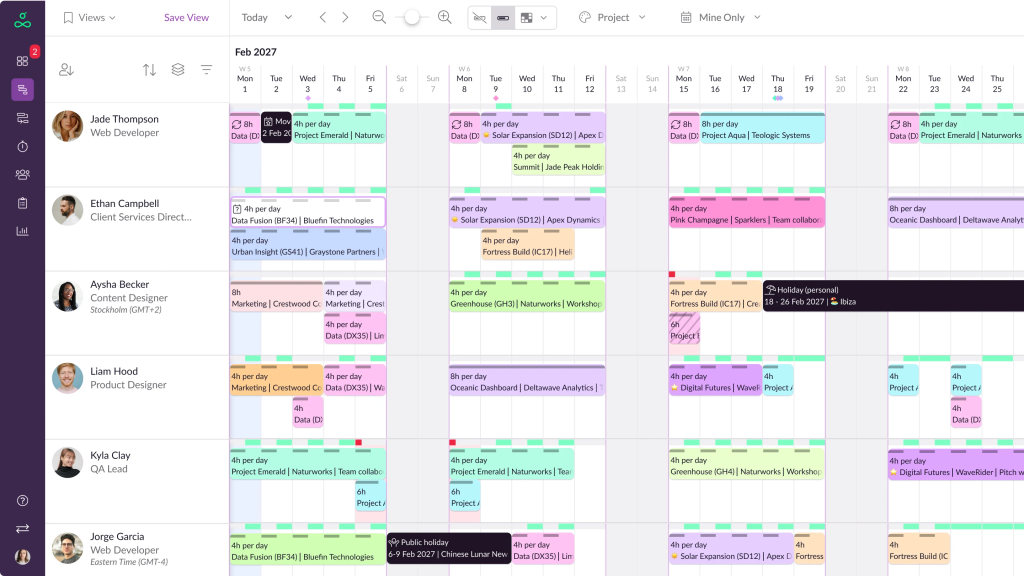
Resource Guru keeps resource scheduling simple. Its visual calendar gives managers a quick view of who’s booked, who has capacity and where potential scheduling clashes are creeping in.
That makes it a strong option for teams that want to get out of spreadsheets and bring day-to-day scheduling into one shared place, without introducing a heavyweight planning system.
TL;DR
- Best for: Teams that want simple, visual resource scheduling
- Core strength: Clear visibility into availability and workload
- Scheduling: Drag-and-drop calendar with clash management
- Capacity: Heatmaps highlight over- and under-utilisation
- Leave: Holidays and other time off can be managed within the schedule
- Integrations: Google Calendar, Outlook, Slack, Microsoft Teams and more
Standout features
- Visual resource calendar: See people, projects and bookings in one shared schedule.
- Drag-and-drop scheduling: Add and adjust bookings as plans change.
- Clash management: Identify potential double bookings before they cause problems.
- Capacity heatmaps: Quickly see who’s overloaded, available or underutilised.
- Custom fields and filters: Organise resources around the information that matters to your team.
- Leave management: Include holidays and other absences when calculating availability.
- Daily schedule emails: Keep team members updated on upcoming bookings.
What users say
Ease of use comes up regularly in Resource Guru reviews.
One Capterra reviewer described it as having an “easy to use UX”, while also pointing out that it lacks some of the more detailed project-management functionality they needed.
That pretty neatly sums up where Resource Guru fits. Its strength lies in making scheduling clear and accessible, rather than trying to cover every aspect of project, financial or workforce management.
Verdict
Resource Guru does a good job of taking the everyday friction out of resource scheduling. The visual calendar, heatmaps and clash management features make it easy to understand capacity and adjust plans quickly.
For teams whose scheduling requirements are relatively straightforward, that simplicity is a big part of its appeal.
Float: Best for visual scheduling with financial visibility
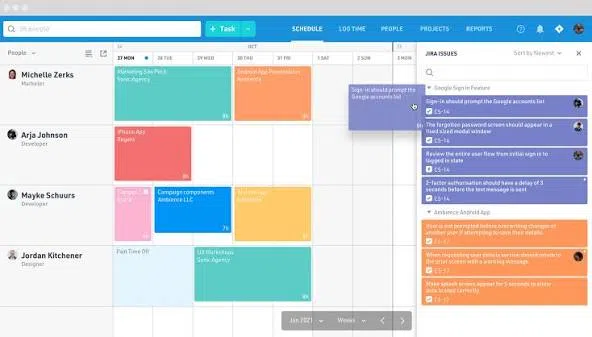
Float combines a clean, visual resource schedule with capacity, utilisation and financial insights. So, alongside seeing who’s working on what, managers can understand how their scheduling decisions could affect project budgets, revenue and margins.
It’s particularly popular with agencies, consultancies and other project-based teams that want resource scheduling to stay easy to use while bringing some commercial context into the picture.
TL;DR
- Best for: Teams that want visual scheduling alongside financial visibility
- Core strength: Connecting people schedules with capacity and project economics
- Scheduling: Drag-and-drop resource scheduling across people and projects
- Capacity: Real-time availability and workload visibility
- Financials: Revenue, margin and project budget forecasting
- Integrations: HubSpot, Slack, Asana, Jira, Google Calendar, Outlook, monday.com and more
Standout features
- Drag-and-drop scheduling: Create, move and adjust resource bookings from a visual schedule.
- Capacity planning: See availability and workload across individuals and teams.
- Financial forecasting: Understand the potential revenue and margin impact of resource plans.
- Project estimates: Set baseline budgets and compare estimates with actual performance.
- Utilisation tracking: Monitor planned and actual utilisation.
- Leave management: Factor holidays and time off into available capacity.
- Integrations: Connect scheduling with calendars, project management tools and wider workflows.
What users say
Float’s usability is a recurring theme in customer reviews.
One Capterra reviewer described it as “very easy to use” and praised the filtering options for simplifying the schedule. The same reviewer noted that larger schedules can sometimes feel like an “info dump”, which is worth considering if you’re managing a particularly large or complex workforce.
Overall, users frequently highlight Float’s clear interface, quick setup and visibility across multiple projects.
Verdict
Float hits a useful middle ground between straightforward resource scheduling and deeper commercial planning.
Its visual interface keeps day-to-day scheduling accessible, while utilisation, estimation and financial forecasting features give managers more context around the consequences of their resource decisions. For teams that want to keep people, capacity and project economics visible in one place, it’s a strong option.
Teambook: Best for simple drag-and-drop resource scheduling
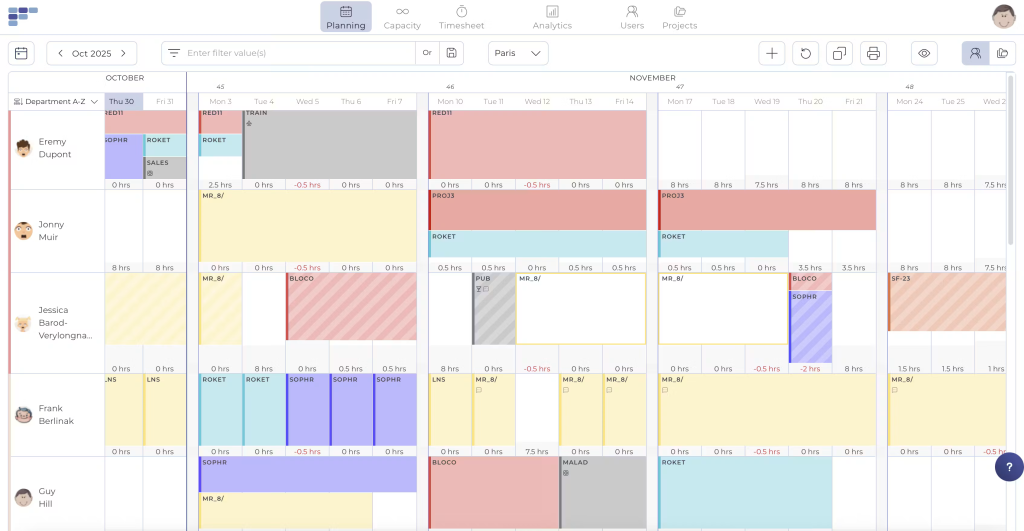
Teambook is a cloud-based resource scheduling tool built around simplicity. Its visual planner helps teams see availability, allocate people to projects and make quick changes as workloads shift.
For smaller and mid-sized teams moving away from spreadsheets, that straightforward approach is a big part of the appeal. You can get a clear picture of who’s doing what without wading through features you may never use.
TL;DR
- Best for: Small to mid-sized teams that want straightforward resource scheduling
- Core strength: Simple, visual planning with a low learning curve
- Scheduling: Drag-and-drop bookings and timeline views
- Capacity: Forward-looking availability and workload planning
- Reporting: Utilisation and planned vs actual hours
- Integrations: Google Calendar, Outlook, HubSpot, Jira, Slack and REST API
Standout features
- Visual timeline scheduling: See bookings and availability across people and projects.
- Drag-and-drop planning: Move and adjust allocations as schedules change.
- Capacity management: Look ahead at availability and upcoming workload.
- Utilisation tracking: Identify underused or overloaded capacity.
- Timesheets: Compare scheduled hours with time actually spent on projects.
- Leave management: Account for holidays, working patterns and other absences.
- Project allocation: Assign people based on availability, workload and relevant resource information.
What users say
Ease of use is one of Teambook’s main selling points, and that comes through in user feedback too. Reviewers regularly highlight the clean interface, visual schedule and relatively quick onboarding.
For growing organisations, the trade-off is depth. Teams looking for more sophisticated financial reporting, enterprise forecasting or advanced skills-based matching may eventually find they need additional functionality.
Verdict
Teambook keeps resource scheduling simple, which is exactly what many teams need. Its visual planner, capacity management and utilisation features cover the core day-to-day scheduling requirements well. For smaller and mid-sized organisations looking for an accessible way to bring their resource plan into one place, it’s well worth considering.
Hub Planner: Best for scheduling across multiple teams
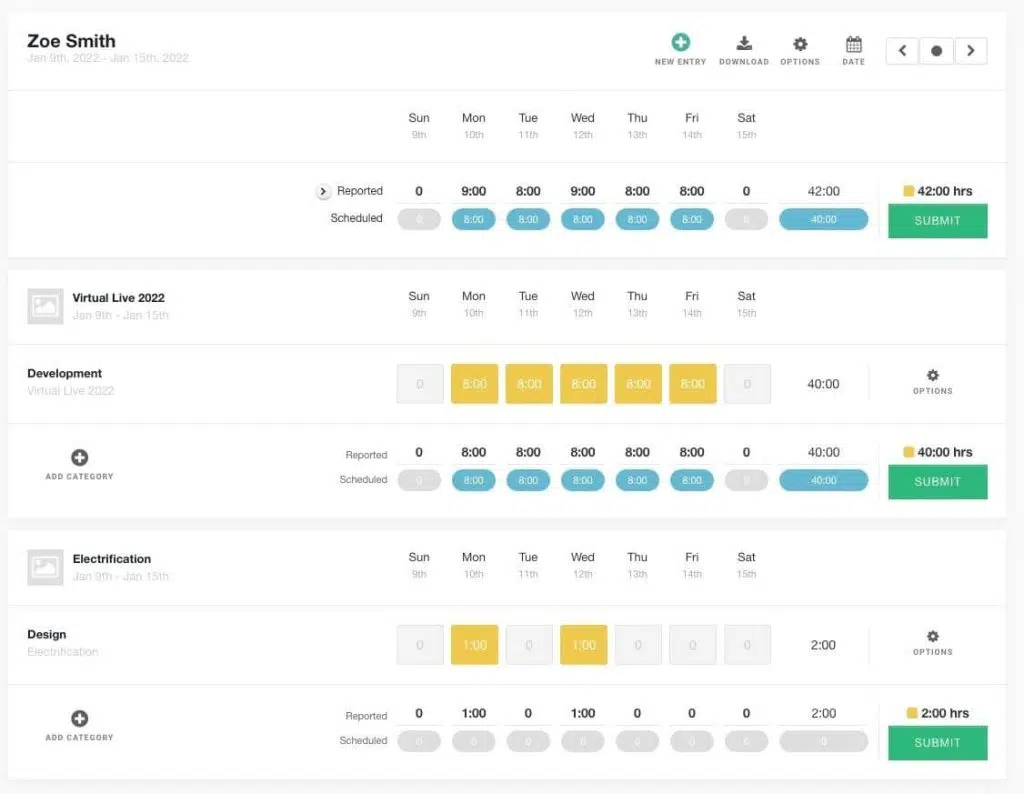
Hub Planner is a resource scheduling and time-tracking platform designed to give managers a central view of people, projects and capacity. Its combination of visual scheduling, resource heatmaps and reporting makes it particularly useful for organisations managing workloads across several teams or departments.
The platform sits somewhere between lightweight scheduling and more detailed resource planning, giving teams plenty of visibility without moving into the complexity of an enterprise resource management system.
TL;DR
- Best for: Medium to large teams managing resources across multiple projects
- Core strength: Centralised scheduling with strong capacity and utilisation visibility
- Scheduling: Drag-and-drop resource planner
- Capacity: Heatmaps and availability views
- Reporting: Utilisation, time and budget reporting
- Integrations: Jira, Slack, Trello, Asana, Outlook, Google Calendar, Salesforce and more
Standout features
- Drag-and-drop scheduling: Create and adjust bookings from a central resource calendar.
- Resource heatmaps: Quickly identify available, underutilised and overloaded team members.
- Capacity planning: See future availability across people and teams.
- Timesheets: Compare scheduled hours with actual time worked.
- Leave management: Include holidays and other time off in resource availability.
- Utilisation reporting: Track how effectively capacity is being used.
- Custom fields and filters: Find and organise resources using relevant criteria.
- Role-based access: Control what different users can see and manage.
What users say
Users often highlight Hub Planner’s scheduling visibility as one of its strengths.
One Capterra reviewer said they “mostly use the scheduling view”, while another described the platform as useful for businesses that are starting and scaling.
There are a couple of caveats worth knowing about. Some reviewers have mentioned occasional bugs, while one management consulting user said their organisation eventually needed better connectivity between systems as it grew.
Verdict
Hub Planner gives resource managers a practical combination of visual scheduling, capacity management and utilisation reporting.
For organisations juggling multiple teams and projects, its heatmaps and central scheduler make it easier to see where capacity sits and react quickly when plans change. It’s a solid step up for teams that have outgrown simpler scheduling methods and want greater visibility without unnecessary complexity.
Best resource scheduling software with wider project and business management
Sometimes resource scheduling is only one part of the puzzle. You might also need to manage project timelines, track time, monitor budgets, collaborate on tasks or understand whether the work you’ve scheduled is actually profitable. In that case, it can make sense to choose a broader platform that includes resource scheduling software alongside project and business management features.
There is a trade-off to consider here. Broader platforms can reduce the number of systems your team needs to manage, although their resource scheduling capabilities may be less specialised than tools built specifically around resourcing.
If you’re looking for that wider functionality, these five platforms are worth exploring:
- Productive: Best for agencies and consultancies
- Scoro: Best for connecting scheduling with finance
- Celoxis: Best for project and portfolio management
- Wrike: Best for collaborative work management
- monday.com: Best for flexible, lightweight workload planning
Let’s start with Productive.
Productive: Best for agencies and consultancies
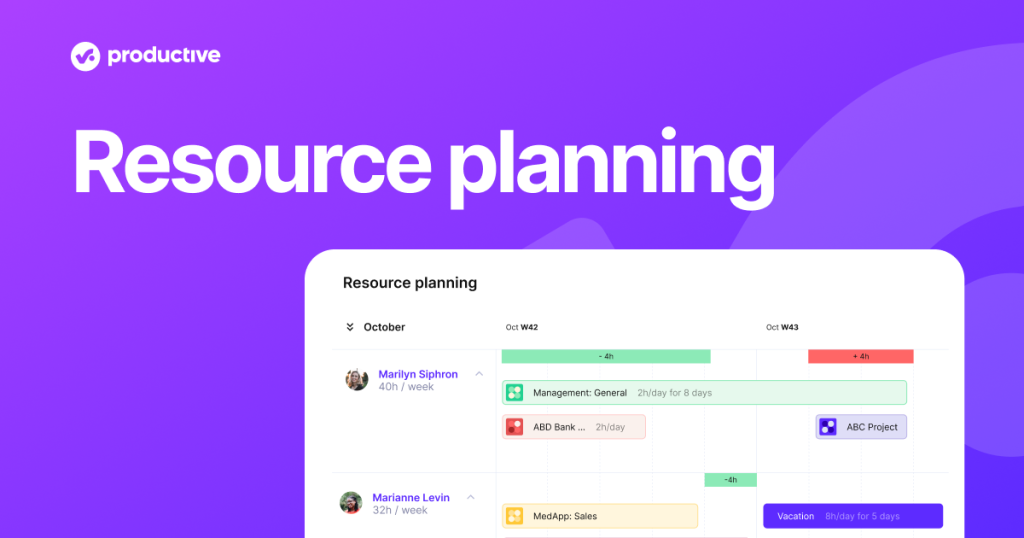
Productive combines resource scheduling with project management, time tracking, budgeting and financial reporting. It’s designed primarily for agencies and service-based businesses that want to see how the people they schedule onto projects affect utilisation and profitability.
That wider view can be particularly useful when you’re juggling lots of clients at once. Resource managers can plan upcoming work and check capacity, while project and commercial teams keep track of budgets, time and margins in the same platform.
TL;DR
- Best for: Agencies, consultancies and service-based teams
- Core strength: Connecting resource scheduling with project profitability
- Scheduling: Visual workload and resource planning
- Capacity: Availability and workload forecasting
- Financials: Budgets, revenue, margins and profitability
- Integrations: Slack, HubSpot, QuickBooks, Xero, Microsoft Teams, Google Workspace, Jira, Asana and more
Standout features
- Resource scheduling: Allocate people across client projects and see upcoming workloads.
- Capacity forecasting: Identify future availability and potential resource gaps.
- Utilisation tracking: Monitor billable and non-billable capacity.
- Project budgeting: Connect planned resource time with project budgets.
- Profitability reporting: Compare planned and actual revenue, costs and margins.
- Time tracking: Record actual hours against projects and budgets.
- Scenario planning: Explore the effect of changing resources, rates or project plans.
- Custom reporting: Bring together resource, project and financial data in dashboards.
What users say
Productive gets plenty of praise for the breadth of functionality it gives service businesses.
One Capterra reviewer described it as a “very efficient and user-friendly tool” covering project management, time logs, budgeting and reporting.
There are some mixed experiences around resourcing and navigation. One management consulting reviewer commented that “resourcing can be a bit off”, while another user found navigation within the platform less intuitive in places.
For teams considering Productive specifically for resource scheduling, those are areas worth putting through their paces during a trial or demo.
Verdict
Productive is a strong all-rounder for service businesses that want resource scheduling closely connected with project delivery and financial performance.
For agencies in particular, being able to see capacity, utilisation, budgets and profitability together can make it much easier to understand the impact of scheduling decisions before they show up in the margin report.
Scoro: Best for connecting scheduling with finance
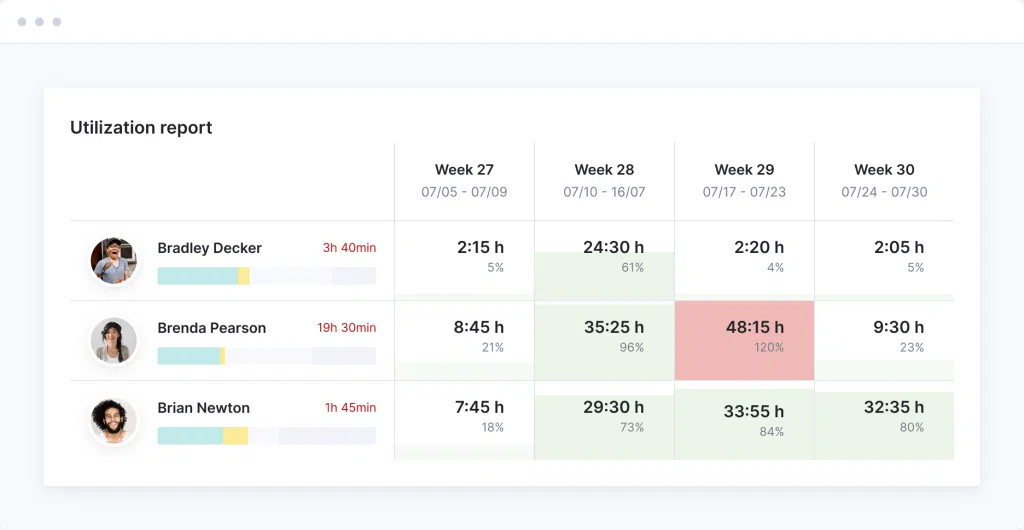
Scoro brings resource scheduling, project management, time tracking and financial management together in one platform. It’s aimed at professional services firms, consultancies and agencies that want to understand how their people, projects and finances are performing without piecing the picture together across multiple tools.
For resource scheduling, that means managers can plan workloads and monitor capacity while keeping an eye on billable time, project budgets and profitability.
TL;DR
- Best for: Service businesses that want scheduling and financial management in one platform
- Core strength: Connecting resource plans with budgets, revenue and margins
- Scheduling: Visual resource planning and workload management
- Capacity: Availability and utilisation forecasting
- Financials: Budgets, costs, revenue, billing and profitability
- Integrations: Xero, QuickBooks, Sage Intacct, Expensify, Jira, Slack, Asana and more
Standout features
- Resource scheduling: Plan and balance workloads using visual resource views.
- Capacity planning: See upcoming availability and resource demand.
- Utilisation tracking: Monitor billable and non-billable time across teams.
- Financial management: Track project revenue, costs and margins.
- Quoting and invoicing: Manage commercial workflows from initial quote through to billing.
- Time tracking: Capture time against projects and client work.
- Forecasting: Use current resource and project data to anticipate future capacity and revenue.
- Custom dashboards: Bring operational and financial KPIs together for reporting.
What users say
Scoro’s ability to bring different parts of service delivery together comes through strongly in its reviews.
One Capterra reviewer said the dashboards make it easy to see where their team is spending “too much or too little time”, while a management consulting user praised the real-time view of performance and ability to make decisions using current data.
The breadth of the platform can come with a learning curve. Other reviewers have described the interface as complex in places, so usability is something worth testing against the workflows your team uses most often.
Verdict
Scoro’s biggest appeal is the breadth of the picture it provides. Resource managers can see capacity and workloads, while project and commercial teams can follow the financial consequences of those plans through to billing and profitability.
For service businesses that want scheduling to sit inside a wider business management platform, Scoro is a strong contender.
Celoxis: Best for project and portfolio management
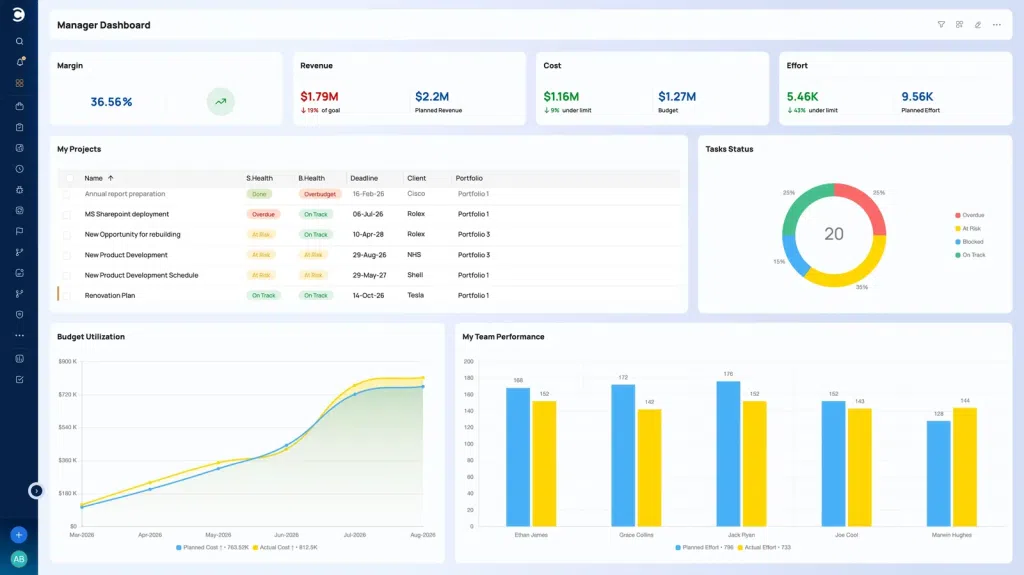
Celoxis combines resource scheduling with project and portfolio management, giving organisations a way to plan people across multiple projects while keeping timelines, budgets and delivery performance visible.
It’s particularly relevant for PMOs and project-based organisations managing lots of concurrent work, where the challenge is often understanding how the same pool of people is being used across the entire portfolio.
TL;DR
- Best for: PMOs and organisations managing multiple concurrent projects
- Core strength: Connecting resource allocation with project and portfolio planning
- Scheduling: Resource allocation and workload planning across projects
- Capacity: Availability and utilisation tracking
- Financials: Project budgets, costs and financial reporting
- Integrations: Jira, Salesforce, QuickBooks, Microsoft Project, Excel and REST APIs
Standout features
- Resource allocation: Assign and manage people across multiple projects.
- Capacity planning: See availability and workload across the portfolio.
- Utilisation tracking: Monitor how resources are being used across billable and non-billable work.
- Portfolio management: View resource requirements alongside project priorities and progress.
- Project financials: Connect resource plans with budgets, costs and financial performance.
- Scenario planning: Explore allocation changes before putting them into action.
- Custom dashboards: Build reports around resources, projects, timelines and financial metrics.
What users say
Celoxis users regularly highlight the depth of its reporting and portfolio management capabilities.
One Capterra reviewer praised its “powerful reporting and portfolio management features”, while noting that implementation can take some time. Other reviewers have similarly highlighted a learning curve alongside the platform’s customisation and reporting capabilities.
That’s worth bearing in mind if quick adoption is high on your priority list. Celoxis offers plenty of depth, but teams may need some time to configure it around the way they work.
Verdict
Celoxis gives PMOs a useful bridge between resource planning and wider portfolio management. Its capacity, utilisation, financial and reporting features help organisations understand resource decisions in the context of everything else being delivered.
For organisations managing a large number of concurrent projects, that portfolio-level visibility is where Celoxis is likely to provide the most value.
Wrike: Best for collaborative work management
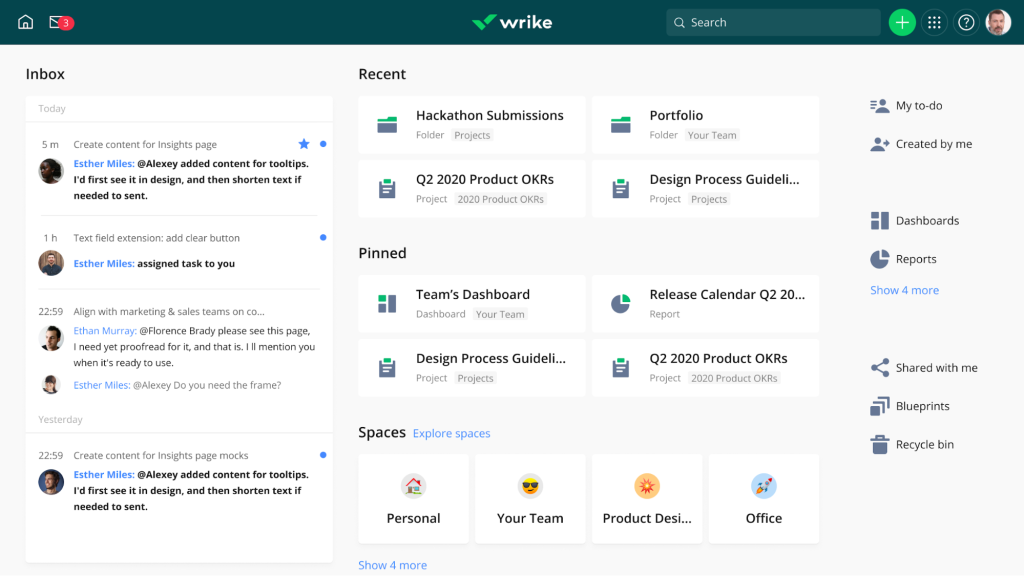
Wrike combines project management, workload planning and collaboration in one platform. Its resource features give managers visibility into team capacity and assignments, while the wider platform helps teams manage the actual work around those schedules.
That makes it a good fit for cross-functional organisations where resource scheduling needs to sit alongside tasks, approvals, deadlines and day-to-day project collaboration.
TL;DR
- Best for: Cross-functional teams managing collaborative project work
- Core strength: Bringing workload planning and project collaboration together
- Scheduling: Workload views and resource allocation
- Capacity: Team availability and effort planning
- Automation: Custom workflows and automated routine tasks
- Integrations: Salesforce, Google Workspace, Microsoft Teams, Slack, Zoom, Jira, HubSpot and more
Standout features
- Workload planning: See how assignments are distributed across individuals and teams.
- Resource allocation: Adjust workloads as capacity and priorities change.
- Effort management: Estimate the effort required for work and factor it into resource plans.
- Custom dashboards: Create different views for resource managers, project leads and other stakeholders.
- Workflow automation: Automate repetitive updates, approvals and notifications.
- Project portfolio management: Monitor multiple projects and their resource requirements.
- Collaboration tools: Keep tasks, feedback, files and approvals connected to the work.
What users say
Collaboration and flexibility feature regularly in Wrike reviews. Users highlight its ability to bring work into one shared environment, particularly when teams need to coordinate projects across different functions.
There are some usability considerations. One Capterra reviewer described the time tracking and project management functionality as okay, while commenting on software glitches. Other feedback has highlighted limitations around more complex workflows and approvals.
For teams considering Wrike for resource scheduling, it’s worth testing how its workload views handle the level of planning detail you actually need.
Verdict
Wrike is a versatile option for teams that want workload planning built into a broader collaborative work management platform.
Its strength is keeping resource allocation close to the projects, tasks and workflows those people are actually delivering. For cross-functional teams that want one place to coordinate both capacity and execution, that can be a useful combination.
monday.com: Best for flexible, lightweight workload planning
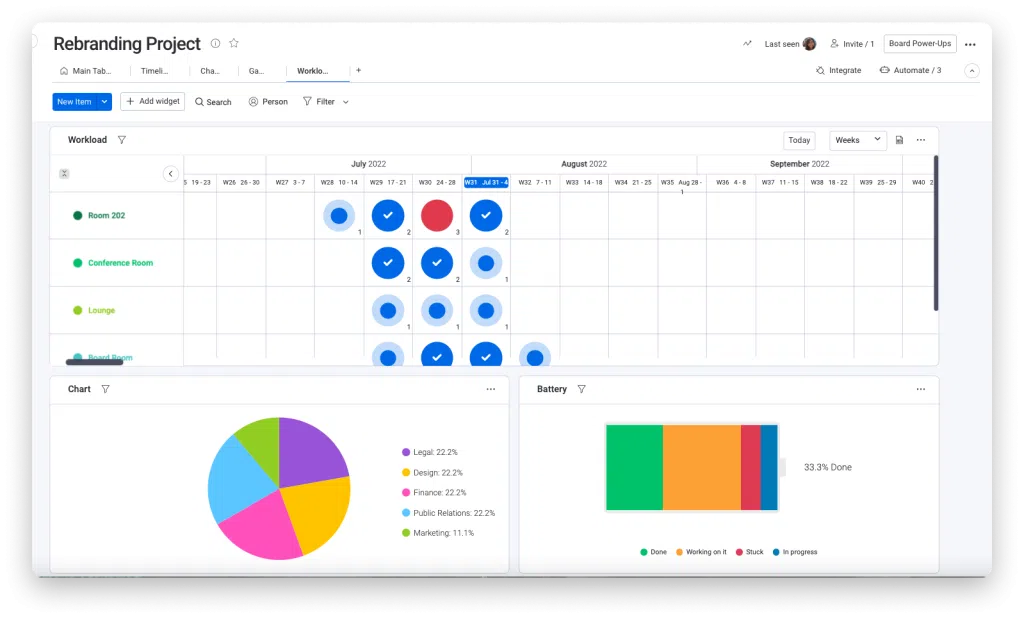
monday.com is one of the more familiar names on this list, although resource scheduling is only one part of what it does. The wider platform is designed for work and project management, with customisable boards, workload views and automations that can be adapted for basic resource scheduling.
Its flexibility makes it a good option for smaller and mid-sized teams that want to keep project work and team capacity visible without introducing dedicated resource scheduling software.
TL;DR
- Best for: Small to mid-sized teams with relatively straightforward scheduling needs
- Core strength: Flexible, easy-to-customise workload planning
- Scheduling: Workload, timeline and calendar views
- Capacity: Visual workload management by person or team
- Automation: Automated updates, reminders and workflow actions
- Integrations: Google Drive, Slack, Excel, Outlook, GitHub, Dropbox, Zapier and more
Standout features
- Workload views: Visualise assignments and capacity across team members.
- Timeline and Gantt views: See scheduled work alongside project milestones and deadlines.
- Customisable boards: Build workflows around different teams, projects or resource requirements.
- Automations: Trigger notifications, updates and other actions when plans change.
- Dashboards: Combine project and workload information into shared reporting views.
- Collaboration: Keep project communication, files and updates alongside the work.
- Integrations: Connect monday.com with a large ecosystem of third-party tools.
What users say
Ease of use and customisation come up frequently in monday.com reviews.
One Capterra reviewer described it as “user-friendly”, while another said the platform can streamline operations and provide real-time progress tracking.
Its flexibility can also be a limitation when your scheduling requirements become more specialised. Some users view monday.com as a lighter alternative to more sophisticated project management platforms, and the same consideration applies to resource scheduling.
Verdict
monday.com gives smaller and mid-sized teams a flexible way to bring workload planning into the same environment they use to manage projects.
For straightforward scheduling, its visual workload views, dashboards and automations cover a lot of ground. Teams with more complex resourcing requirements will likely want more specialised functionality, but for lighter planning needs, monday.com remains an accessible option.
What should resource scheduling software actually do?
At its simplest, resource scheduling software helps you see who’s available and assign them to work. But as your team grows, that’s usually only the beginning.
A good resource scheduling system should give you enough information to make confident decisions quickly, especially when projects move, priorities change or several teams are competing for the same people.
Here are the capabilities we’d look for:
- Real-time availability: See who has capacity now and who’s coming available soon.
- Visual scheduling: Create, move and adjust bookings without rebuilding the whole plan.
- Conflict management: Spot double bookings, overallocations and workload problems early.
- Capacity planning: Understand whether you have enough people to meet upcoming demand.
- Skills and experience: Find people who have the capabilities required for a particular project or role.
- Leave and working patterns: Factor holidays, part-time hours and other absences into your plans.
- Forecasting: Look beyond this week’s schedule to understand future capacity and resource gaps.
- Utilisation tracking: See how effectively available resource is being deployed.
- Integrations: Keep scheduling connected with your HR, CRM, finance, project and calendar systems.
- Reporting: Give resource managers and leadership a clear view of workload, demand and performance.
And increasingly, there’s another capability to add to the list: suitability matching.
Having 20 people available doesn’t help much if you still have to manually work out which one has the right combination of skills, experience and qualifications. AI-powered resource scheduling can help narrow that search, analysing multiple criteria and surfacing the people most suited to the work.
For complex organisations, that can turn resource scheduling from a calendar exercise into a much more intelligent matching process.
How to choose the best resource scheduling software
With so many options available, choosing the best resource scheduling software comes down to understanding how your organisation actually schedules people.
Here are eight things we’d look at before making a decision.
1. Start with the complexity of your scheduling
First, map out what goes into a typical scheduling decision. Do you mainly need to know who’s available? Or do resource managers also have to consider skills, certifications, experience, location, client requirements, utilisation and project economics? The more criteria involved, the more likely you are to need specialist resource scheduling software rather than a simple visual planner.
2. Look at how the software handles skills
Availability tells you who can do the work. Skills data helps you understand who should do it. Look at how easily resource managers can search for specific skills, proficiency levels, certifications and relevant experience. For larger organisations, a standardised skills taxonomy can also make searches much more reliable across different teams and departments.
This is particularly important in professional services, where specialist expertise and qualifications can determine whether someone is suitable for an engagement.
3. Test what happens when plans change
Because they will.
A project gets delayed. Someone goes on leave. A client suddenly needs another person next week. Your scheduling software should make those changes relatively painless.
During a demo, test how quickly you can move bookings, resolve conflicts, find replacement resources and understand the knock-on effect on capacity.
4. Take a close look at AI and automation
AI is becoming a bigger part of resource scheduling, but dig into what the feature actually does. Can it recommend suitable resources? What information does it use to make those recommendations? Can you understand why someone has been suggested?
For example, Retain’s AI-powered matching uses signals including skills, job role, primary skill preferences and availability, with reasoning and transparent audit trails behind its recommendations. The resource manager still needs enough information to apply their own judgement to the final decision.
5. Check forecasting and capacity planning
Today’s schedule only tells you so much. Good resource scheduling software should help you understand what’s coming next: where demand is building, which teams are approaching capacity and where you could face skills or resource shortages. Look for forecasting and scenario-planning capabilities that allow you to explore future demand before it becomes an immediate scheduling problem.
6. Consider how far you need to see across the business
This becomes increasingly important as organisations grow. Can a resource manager search beyond their immediate team? Can they find suitable people in another department, office or region? Can leadership see capacity and demand across the organisation? Cross-department visibility can also help uncover expertise that would otherwise stay hidden inside individual resource pools.
7. Check your integrations
Resource scheduling relies on information held elsewhere in the business, so make a list of the systems your new platform needs to work with.
That might include your:
- HR system
- CRM
- ERP
- finance software
- project management platform
- calendars
- time-tracking tools
The less manual reconciliation your resource team has to do, the better.
8. Think about where you’ll be in a few years
Finally, don’t choose purely around the scheduling problem you have today. Think about whether the platform can support more people, departments, locations and complex resource requirements as your organisation grows.
A lightweight visual scheduler might be exactly what you need right now. If you expect skills-based matching, enterprise integrations, cross-department planning or AI-assisted scheduling to become important fairly soon, factor that into your shortlist from the start.
Which resource scheduling software is right for you?
There’s a reason we haven’t ranked these 13 tools from best to worst. The best resource scheduling software for your business depends on what you’re actually trying to schedule.
If you need a clear visual calendar and an easier way to manage availability, tools such as Resource Guru, Float, and Teambook cover that ground well. If scheduling sits within a wider project or financial management process, platforms such as Productive, Scoro and Kantata give you more functionality in one place.
Then there are organisations where scheduling gets considerably more complicated. You might be allocating thousands of people across departments and locations, while also considering specialist skills, certifications, client experience, utilisation and changing demand.
That’s where platforms such as Retain come into their own.
Retain brings together live capacity, skills intelligence and AI-powered matching to help resource managers narrow large talent pools into genuinely suitable options. With Skills+, behavioural profiling and cross-department visibility, it gives professional services firms a much richer picture of who they have available and where their expertise can have the greatest impact.
Ultimately, the question to ask when comparing resource scheduling tools is pretty simple: how much information do you need to make a good scheduling decision?
Once you know that, your shortlist gets a whole lot easier.
Book a personalised demo of Retain to see how skills-based, AI-powered resource scheduling works in practice.
Frequently Asked Questions
Resource scheduling software helps organisations plan when and where people are assigned to work. It gives managers visibility into availability, capacity and existing bookings, making it easier to allocate people across projects without overbooking them. More advanced platforms can also factor in skills, experience, certifications, utilisation and project requirements when helping managers decide who to schedule.
The best resource scheduling software depends on the size and complexity of your organisation. For straightforward visual scheduling, tools such as Resource Guru, Float and Teambook are worth considering. Professional services firms with more complex, skills-dependent scheduling requirements may be better suited to platforms such as Retain, while PMOs focused on portfolio-level capacity planning may want to consider Meisterplan.
Start with the factors that determine a scheduling decision in your organisation, then choose software capable of handling that level of complexity.
Resource scheduling focuses specifically on when people are available, what they’re assigned to and how work is distributed across a team.
Resource management covers a wider set of activities, which can include capacity planning, utilisation, skills management, forecasting, workforce planning and employee development.
There’s plenty of overlap between the two, which is why many of the platforms in this guide offer both resource scheduling and broader resource management functionality.
Professional services firms often need resource scheduling software that can account for skills, certifications, relevant experience, client requirements, availability and utilisation.
Retain is built specifically around these more complex professional services requirements. It combines resource scheduling with Skills+ skills intelligence, AI-powered matching, behavioural profiling and cross-department visibility across teams such as Audit, Tax and Advisory.
Yes. Some resource scheduling platforms allow managers to search for people using skills alongside availability.
More sophisticated systems can go further. Retain, for example, uses a standardised Skills+ taxonomy powered by Lightcast, with up to 30,000 skills available to build a business-specific taxonomy. Resource managers can use information such as skill level, recency and verified experience when searching for suitable people.
AI can automate or accelerate parts of the resource scheduling process, particularly the time-consuming job of finding suitable people.
AI-powered matching can analyse multiple signals and recommend resources that fit the requirements of a role or project. This can be especially useful in large organisations where manually searching hundreds or thousands of employee profiles would take significant time.
The strongest use cases still give resource managers visibility into why someone has been recommended, allowing them to apply their own knowledge and judgement before confirming the booking.
Yes. Many resource scheduling tools include conflict or clash management features that alert managers when someone is already booked or when a new assignment would push them beyond their available capacity.
The exact functionality varies between platforms, so it’s worth testing how conflicts are identified, displayed and resolved during a demo.
Yes. Many resource scheduling platforms integrate with wider business systems so that availability, project, workforce and financial information can flow between them.
For example, Retain integrates with platforms including Microsoft Dynamics 365, Office 365, Salesforce, Workday, SAP and IRIS.
If integrations are important to you, check both whether your systems are supported and how frequently information is synchronised. The quality of the integration can matter just as much as the length of the integrations list.
Our editorial process
Written from interviews with resource managers in IT consulting firms, alongside anonymised patterns from Retain customer data. Direct quotes are used with permission and lightly edited for length.
Reviewed for accuracy by Retain’s resource management practice leads before publication. Claims about outcomes are checked against source data or removed.
The summary at the top of this page is generated from the article text. The article itself is written and edited by people. AI is not used to draft claims, quotes or data.
Spotted something wrong? Email editorial@retaininternational.com and we will correct it, noting the change at the foot of the article.