If you’re looking for capacity planning software for professional services, you probably want to understand whether you have enough people to deliver the work. Sounds simple enough. Until your dashboard says you have 1,200 hours available next month, then a new project lands and you still can’t staff it.
Hours only count if the people behind them have the right skills, experience, seniority, and availability for the work. That’s what we mean by deployable capacity. And it’s a much more useful way to think about capacity in professional services.
So, let’s look at what your capacity planning software needs to tell you, and what to look for when choosing a platform.
Short on time? Here are the highlights:
Keen to learn more? You’ll just have to keep reading ⬇️ |
Why capacity planning is different in professional services
Let’s start with the problem. People aren’t interchangeable blocks of time. You might have five consultants free next week. But if the project needs someone with a particular certification, sector experience, or level of seniority, only one of them may be genuinely available for that work.
Add client preferences, location, utilisation targets, and existing commitments into the mix, and a healthy-looking capacity figure can quickly drop.
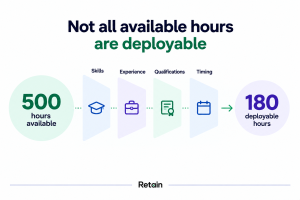
This also explains why planning purely by headcount or available hours can be misleading. To understand your real capacity, you need to see who is available, what they can do, and where that capability matches upcoming demand.
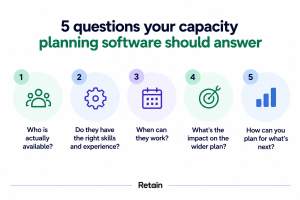
5 questions your capacity planning software should answer
So, how do you know whether your capacity planning software is giving you the full picture?
Let’s start with the obvious one.
1. What capacity do we actually have?
It’s safe to say you need a reliable view of who’s available, when they’re available, and how much capacity they have. This means bringing together existing bookings, upcoming work, leave, part-time hours and other commitments, so you can see where there’s room and where people are already stretched.
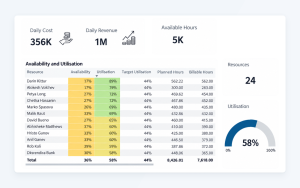
And you need to be able to look ahead. Seeing that a team is overloaded today is useful. Seeing that they’re heading for a crunch six weeks from now gives you time to do something about it. This gives you your capacity baseline.
2. Do we have the skills to deliver the work coming in?
Having capacity is one thing. Having the right capacity is where things get interesting. Let’s say you have 20 consultants with availability next month. Your pipeline, meanwhile, needs cybersecurity expertise, two people with a particular certification, and someone who knows the client’s sector inside out. Can you quickly see how many of those 20 people fit the bill?
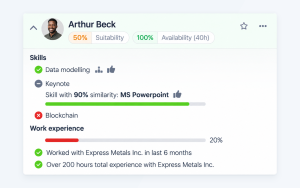
Good capacity planning software, like Retain, should let you forecast capacity by skills, proficiency, experience, and qualifications, so you can see where supply matches demand and where gaps are starting to appear.
3. What happens when demand changes?
Of course, your capacity plan would be much easier to manage if projects always started on time and the pipeline behaved itself. Sadly, neither happens very often!
A project slips by six weeks. A tentative opportunity suddenly gets the green light. An existing engagement needs three more people. Any one of these changes can have a knock-on effect across your resource plan.
This is where scenario planning becomes useful. You can test different versions of the future before they happen:
- What if two major projects start at the same time?
- What if a deal moves forward earlier than expected?
- What if demand for a specialist skill jumps next quarter?
The earlier you can see the impact on capacity, the more options you have to respond, whether that means reshuffling work, developing existing people or hiring ahead of demand.
4. Are we making the best use of the capacity we have?
Here’s where capacity planning gets really interesting. Say Alex is a great match for Project A. They have the skills, experience, and availability, so assigning them seems like an easy decision.
But Alex is also the only person with the specialist experience needed for Project B. Assign them to Project A and you’ve just created a capacity problem somewhere else. Multiply that across hundreds of people and projects, and you can see the problem. Every allocation can affect the options you have elsewhere.
This is why more advanced capacity planning looks across competing requirements together. It helps you explore different combinations and find stronger allocations across the wider resource plan. Sometimes the obvious match for one project isn’t the strongest choice for the business as a whole.
5. Where are our future capacity gaps?
Once you can see capacity and skills together, you can start spotting problems further down the road. Perhaps demand for a particular skill is growing faster than your internal capability. Maybe the same handful of specialists keep appearing on every shortlist. Or you have plenty of people available, but they’re missing the experience needed for the work in your pipeline.
These patterns are useful.
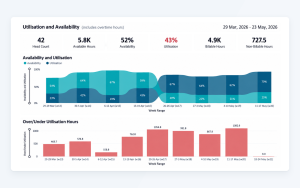
They can help you decide where to recruit, which skills to develop internally, and where stretch assignments could build the capability you’ll need next. You might even discover that you already have more capacity than you thought. Sometimes the expertise you need is sitting elsewhere in the business, waiting to be found.
➡️Related reading: How consulting firms can manage skills shortages without adding headcount
What does deployable capacity look like in reality?
Let’s put some numbers behind this. Imagine a consulting firm has 1,200 hours of capacity available next month. Plenty of room, right?
Then you start applying the requirements of the work in the pipeline:
1,200 hours of total available capacity
↓
940 hours available during the required project dates
↓
610 hours with the right skills and experience
↓
430 hours at the required level of seniority
↓
360 hours once qualifications and client requirements are factored in
Quite a difference.
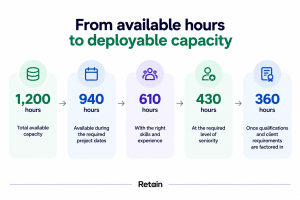
On the original capacity report, the firm has 1,200 hours to play with. In reality, only 360 of those hours can be deployed against this particular mix of work. And that’s exactly why looking at capacity in isolation can catch professional services firms out.
The more accurately you can connect upcoming demand with the people capable of delivering it, the more useful your capacity forecast becomes.
What to look for in capacity planning software for professional services
By this point, you’ve probably gathered that a colourful capacity chart isn’t going to cut it.
So, when you’re comparing capacity planning software for your professional services firm, look for a platform that can help you:
- Forecast capacity by skills and experience, as well as hours and headcount.
- Connect pipeline demand with resource availability so you can plan before work is confirmed.
- Run what-if scenarios to see how changes to projects and pipeline affect capacity.
- Compare allocation options across multiple projects when people and skills are in high demand.
- Spot future skills and capacity gaps early enough to actually do something about them.
- See across teams, offices, and departments so available expertise doesn’t stay hidden in silos.
- Track utilisation and workload alongside capacity to avoid repeatedly leaning on the same people.
- Connect with your wider tech stack, including CRM, HR, finance and ERP systems.
One final tip: ask vendors to show you these things during a demo.
Give them a realistic resourcing problem from your own firm and see how quickly the software can answer it. You’ll learn a lot more than you will from another feature checklist.
How Retain approaches capacity planning for professional services
So, what does all of this look like in Retain?
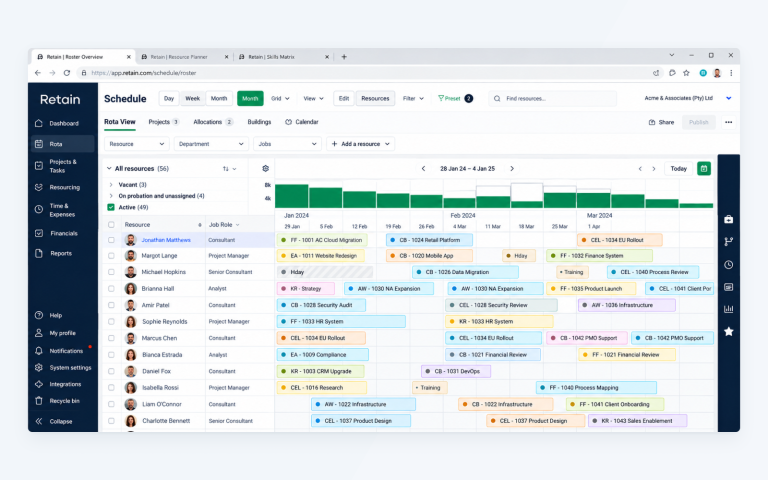
Retain brings capacity, demand, and skills together in one resource planning platform, giving you a live view across teams, departments and locations.
But the interesting bit is what you can do with that visibility.
With Skills+, you can build a standardised skills taxonomy using up to 30,000 skills, then factor proficiency, recency and verified experience into your resource searches.
MatchingCore takes this further by helping you explore resource allocation options across the wider plan. That’s particularly useful when several projects are competing for the same people and the obvious choice for one assignment could create a problem elsewhere.
You can also model future demand, spot upcoming capacity gaps, and see how changes to your resource plan affect utilisation and workload.
And because Retain integrates with systems including Microsoft Dynamics 365, Salesforce, Workday and SAP, capacity planning can sit alongside the systems your firm already relies on.
The result? A much clearer picture of the capacity you can actually put to work.
Turn capacity into something you can actually use
Knowing you have 1,200 hours available sounds useful. Knowing whether those hours match the work you expect to deliver is much more useful.
That’s the real test for capacity planning software in professional services.
You need to understand where capacity is, which skills are available, what demand is coming, and how different allocation decisions affect the wider plan. Get those things working together and you can make earlier, better-informed decisions about projects, people, and future workforce needs.
And hopefully avoid that awkward moment when the capacity dashboard says everything is fine, while your resource managers know otherwise.
Want to see how Retain turns skills, demand, and availability into a clearer view of your deployable capacity? Book a personalised demo.
Our editorial process
Written from interviews with resource managers in IT consulting firms, alongside anonymised patterns from Retain customer data. Direct quotes are used with permission and lightly edited for length.
Reviewed for accuracy by Retain’s resource management practice leads before publication. Claims about outcomes are checked against source data or removed.
The summary at the top of this page is generated from the article text. The article itself is written and edited by people. AI is not used to draft claims, quotes or data.
Spotted something wrong? Email editorial@retaininternational.com and we will correct it, noting the change at the foot of the article.